Behind every order that lands in your ERP without anyone touching it, there’s a chain of small steps. This guide explains each one in plain English, then follows a real order through the system.
How does iPaaS work?
An iPaaS sits between your systems and moves data from one to another. Connectors pick up data when something happens, such as a new order or a stock change. The platform reshapes that data to fit the next system, follows the rules you’ve set and delivers it. Everything is logged and monitored, so failures are caught and retried instead of lost.
For the bigger picture, read our guide to what is iPaaS?
What are the core components of an iPaaS?
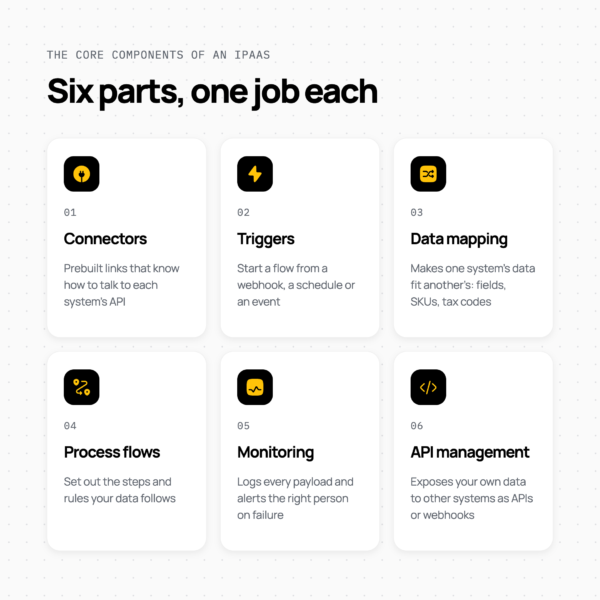
An iPaaS has six core parts: connectors, triggers, data mapping, process flows, monitoring and API management. Each one does a single job.
Connectors
A connector is a prebuilt link that knows how to talk to one system’s API, including how to sign in. Patchworks has connectors for systems such as Shopify, NetSuite, Sage, Business Central and 3PLs such as SEKO Logistics and GXO. When there isn’t one, the Connector Builder creates a connector for any API.
Triggers
A trigger is what starts a flow. There are three common types:
- Webhooks: the source system sends a message the moment something happens, such as Shopify reporting a new order.
- Schedules: the flow runs at set times, such as every 15 minutes.
- Events: the flow starts when a message lands on a queue.
Data mapping and transformation
Data mapping makes one system’s data fit another’s. That covers field names, date formats, SKUs and tax codes, and jobs such as splitting one order into several shipments. This is where most of the real work in an integration happens. Read more about data transformations.
Process flows
A process flow sets out the steps and rules data follows. For example: if the order is B2B, send it to the trade account in the ERP; if it contains a pre-order item, hold it. Read more about process flows.
Monitoring, logging and alerts
Monitoring shows every payload that moved, where it failed and why. Alerts go to email or Slack, so the right person knows about a problem before a customer does.
API management
API management lets you expose your own data to other systems as APIs or webhooks. Read more about APIs and webhooks.
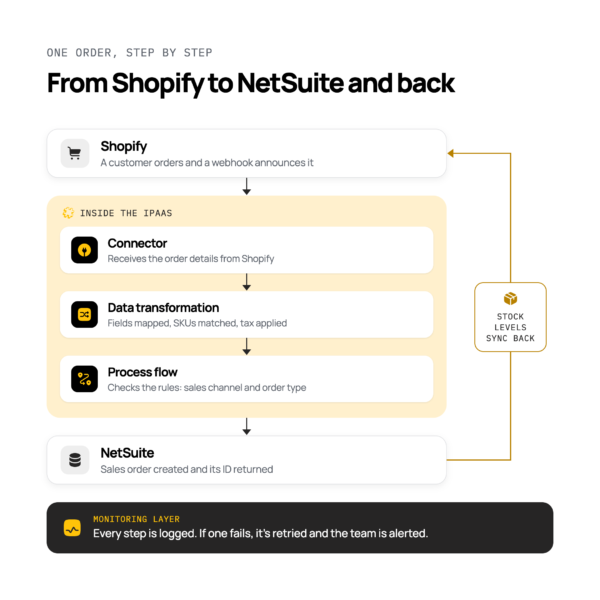
What happens to an order, step by step?
Here’s what happens when a customer orders on Shopify and the business runs NetSuite as its ERP:
- A customer places an order on Shopify.
- Shopify sends a webhook to say there’s a new order.
- The Shopify connector receives the order details.
- The process flow checks the rules, such as which channel the order came from and what type of order it is.
- The order is transformed into a NetSuite sales order: fields are mapped, SKUs matched and tax applied.
- The NetSuite connector creates the sales order.
- NetSuite confirms the order and returns its ID.
- Stock levels update and flow back to Shopify and any marketplaces.
- Every step is logged. If one fails, it’s retried and the team is alerted.
The steps are the same for other ERPs, such as Sage or Business Central. To see how this looks for your systems, read iPaaS for ecommerce.
What are the common iPaaS integration patterns?
An integration pattern is the shape of how systems connect and when data moves. Most retail stacks use a mix of the patterns below.
| Pattern | What it means | When it fits |
| Point-to-point | Each system connects directly to each other system | Two or three systems at most |
| Hub-and-spoke | Every system connects once, to a central platform | Four or more systems |
| Real-time (event-driven) | Data moves the moment something happens | Orders, stock and payments |
| Scheduled (batch) | Data moves at set times, in groups | Catalogue updates and reports |
| Request-reply | One system asks, the other answers straight away | Checking stock or prices live |
| Publish-subscribe | One system publishes a message, and any system that needs it picks it up | One event that several systems care about |
| Hybrid | Cloud apps connect to on-premise or older systems | ERPs or warehouses run on your own servers |
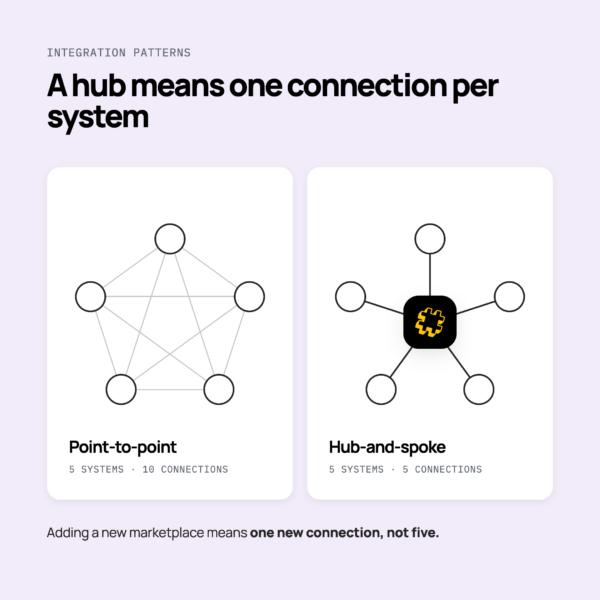
Why hub-and-spoke beats point-to-point
With point-to-point, every new system needs a connection to every other system, and the number of connections grows fast. With a hub, each system connects once. Adding a new marketplace means one new connection, not five.
Connecting cloud and on-premise systems
An iPaaS runs in the cloud, but it can still reach systems that don’t. It connects through SFTP files, EDI with trading partners, or message queues such as Apache Kafka and IBM MQ.
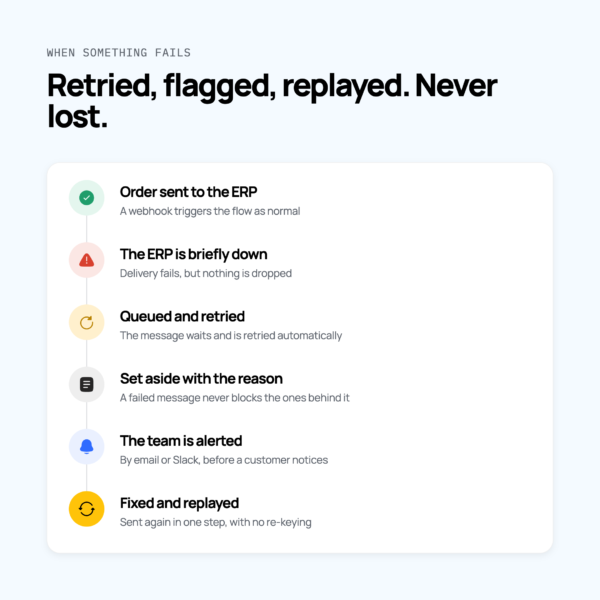
What happens when something fails?
A good iPaaS expects things to fail and is built to recover without losing data. This is the part operations leads should ask about first.
- Queues and retries: if a system is briefly down, messages wait and are retried, so orders aren’t lost.
- Error handling: failed messages are set aside with the reason they failed, instead of blocking everything behind them.
- Alerts: the right person hears about a failure straight away, by email or Slack.
- Replay: once the problem is fixed, failed messages can be sent again without re-keying.
- Peak volumes: the platform handles more traffic at peak and respects each system’s rate limits, so a surge doesn’t knock a connection over.
- Testing: changes are tried in a sandbox before they go live.
Patchworks process flows include built-in error handling, automatic retries, real-time logging and data replay. Micro Scooters UK maintained 100% system uptime across its Black Friday traffic surges on Patchworks. For live service information, see the platform status page and Patchworks’ service level objectives.
How does an iPaaS keep data secure?
An iPaaS keeps data secure by controlling who can reach it, protecting it as it moves, and recording what happened to it. A secure iPaaS should offer:
- Authentication: each connection signs in to its system using methods such as OAuth, API keys or bearer tokens. Read about API authentication for integrations.
- Encryption: data protected while it moves between systems.
- Role-based access: people see and change only the integrations their role needs.
- Audit logs: a record of every change and every payload.
- GDPR: personal data handled under a clear data processing agreement.
Ask every provider for its certifications and the evidence behind them. Patchworks’ are on its security and compliance page.
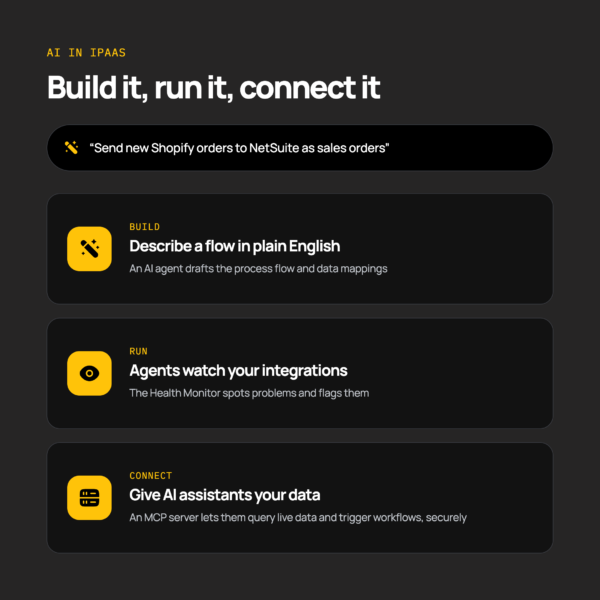
Where does AI fit into iPaaS?
AI now helps with three parts of integration: building flows, running them, and giving AI tools access to your data.
- Building: describe a flow in plain English, and an AI agent drafts the process flow and data mappings. In Patchworks, the AI Implementation Agent does this inside AI Studio.
- Running: AI agents such as the Health Monitor watch integrations and flag problems.
- Connecting AI to your data: an MCP server gives AI assistants secure access to commerce data. They can query live data and trigger workflows, such as retrying a failed order.
AI Studio is available on all Patchworks plans.
Do you need developers to use iPaaS?
Mostly, no. Low-code tools let operations and ecommerce teams build and change most flows without writing code.
Developers help with edge cases, such as a custom rule or an unusual data format. In Patchworks, they can add scripts in languages such as PHP, Python and JavaScript, and AI agents can draft those scripts too. Technical teams can find documentation on the developers page.
To understand how iPaaS compares with building on APIs directly, read iPaaS vs PaaS vs SaaS vs API.