
TL;DR: Patchworks and Apache Kafka solve different problems: Patchworks handles business logic and transformations across ecommerce, ERP, and everything between; Kafka moves events at scale in real time. Combining them — a common ask from large enterprises and systems integrators — means using Patchworks to manage the transformations while Kafka acts as the central nervous system. This covers six ways to connect them via the Kafka Connect framework: HTTP, SFTP, JDBC, S3, RabbitMQ, and a custom-built connector, plus which to reach for depending on your architecture.
Written by Jim Herbert, CEO for Patchworks iPaaS
Patchworks and Apache Kafka solve different problems. Patchworks handles the business logic — transformations, mapping, orchestration — across ecommerce platforms, ERPs, and everything in between. Kafka moves events at scale, reliably, in real time. Put them together and Patchworks becomes the layer managing complex transformations and business logic, while Kafka acts as the central nervous system carrying data between systems.
This isn’t a hypothetical pairing. It’s a common request from large enterprises and global systems integrators building architectures where Kafka is already the backbone and Patchworks needs to plug into it, in both directions.
There’s no single correct way to connect them — which approach fits depends on latency requirements, what’s already in the stack, and how much custom code is worth owning. Here are six, via the Kafka Connect framework, roughly ordered from simplest to most involved.

Six methods, at a glance
| Method | How it works | Best for |
| HTTP | Kafka Connect HTTP connector posts to / is posted to by a Patchworks flow | Real-time, lowest setup, works with almost any flow |
| SFTP | Kafka Connect FilePulse (or similar) watches a directory Patchworks writes to / reads from | Batch processing, systems already built around file drops |
| S3 | Kafka Connect S3 connector watches a bucket Patchworks writes to / reads from | Cloud-native architectures, decoupled storage layer |
| RabbitMQ | Bridge via Kafka Connect’s RabbitMQ connector | Already running RabbitMQ alongside Kafka |
| Custom connector | Purpose-built Java connector calls the Patchworks API directly | Tightest integration, full control over auth / mapping / error handling |
Method 1: HTTP source: Patchworks to Kafka
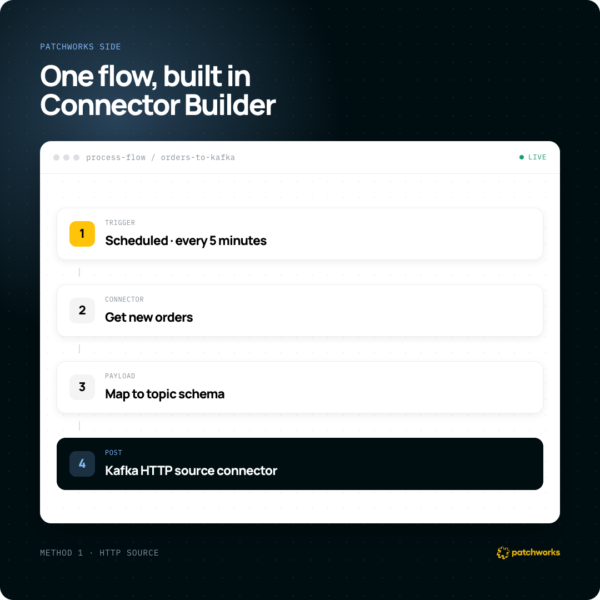
The most direct route is HTTP, using a generic Kafka HTTP connector such as Confluent’s. It’s universal — it works with almost any Patchworks flow — and needs the least Kafka-side setup.
- Build a connector and endpoint in Patchworks — use Connector Builder to create a Kafka connector, configure a flow that gathers the data to stream (new orders, customer updates), and expose it via a REST API endpoint.
- Configure Kafka’s HTTP Source Connector — deploy something like the Confluent HTTP Source Connector to the Kafka Connect cluster to listen for posted messages.
- Data flow — the Patchworks flow runs off its Trigger shape (scheduled, called externally, from another flow, or off an event queue / webhook) and posts to the Kafka topic.
Method 1B: HTTP sink: Kafka to Patchworks
Reverse the flow:
- Build a sink endpoint in Patchworks — a process triggered by webhook or API call that receives a payload and runs a business workflow, such as creating a customer in an ERP.
- Configure Kafka’s HTTP Sink Connector — subscribe it to a topic; for each message, it POSTs to the Patchworks webhook or API endpoint with the message payload as the request body.
Method 2: SFTP, file-based integration
For systems built around batch file processing rather than live events, SFTP is a solid, boring option.
- Source: a Patchworks flow, via the SFTP Connector, generates a file — a CSV of daily sales, say — and drops it on an SFTP server. Kafka Connect FilePulse (or a similar SFTP source connector) watches that directory, reads new files, and streams their contents into a topic.
- Sink: a Kafka Connect SFTP sink connector writes topic messages into a file on the SFTP server; a scheduled Patchworks process picks the file up via its own SFTP connector and processes it.
Method 3: S3, cloud storage
For cloud-native setups, S3 works as a scalable intermediate layer.
- Source: a Patchworks flow, via the S3 Connector, saves data as objects in a bucket. Kafka Connect’s S3 Source Connector monitors the bucket and streams new object data into a topic.
- Sink: the S3 Sink Connector subscribes to a topic and writes messages as objects into a bucket; Patchworks is configured to pick up the new objects.
Method 4: RabbitMQ, bridging message queues
If RabbitMQ is already part of the stack, bridging it to Kafka is straightforward.
- Source: a Patchworks flow, via the Event Connector, publishes to a RabbitMQ exchange; a RabbitMQ Source Connector for Kafka consumes from the queue and pipes messages into a topic.
- Sink: a RabbitMQ Sink Connector takes messages from Kafka and publishes them to a RabbitMQ exchange, where a waiting Patchworks consumer processes them.
Method 5: A customer Java connector, full control
For the tightest integration, build a Java connector specifically for Patchworks within the Kafka Connect framework — full control over authentication, data mapping, and error handling.
Custom source connector: polling a Patchworks flow
- Approach A: the connector’s poll() method makes an authenticated API call to a Patchworks endpoint that triggers a flow, gathers a batch of data, and returns it. The connector transforms this into SourceRecord objects and sends them to Kafka — ideal for systems that don’t support webhooks.
- Approach B: expose an external API call (the HTTP method above) for a Patchworks flow to call via Connector Builder.
Custom sink connector: triggering a Patchworks flow
A custom sink connector subscribes to a topic and triggers a flow for each message. Its put() method receives a batch of SinkRecord objects from Kafka, and for each one extracts the payload, calls the Patchworks API, and triggers the relevant flow — a real-time, efficient way to push Kafka events straight into a Patchworks workflow.
Making the best choice
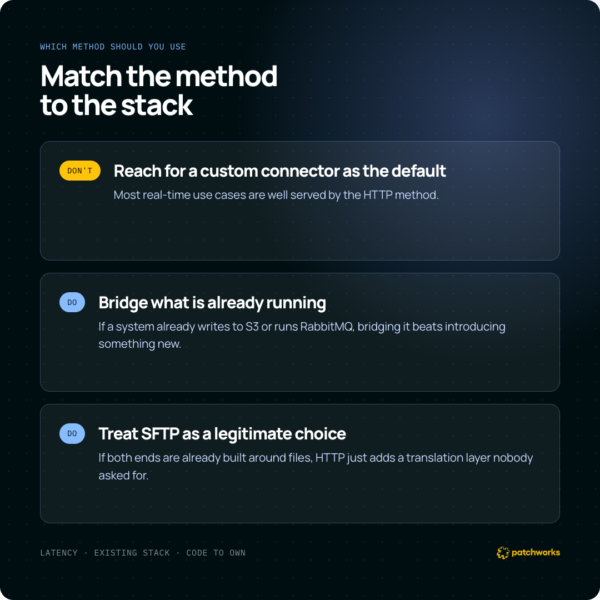
Don’t reach for a custom connector as the default. It’s the most powerful option and the most to maintain — most real-time use cases are well served by the HTTP method.
Do match the method to what’s already in the stack. If a system already writes to S3 or already runs RabbitMQ, bridging that is usually less work than introducing a new one.
Do treat SFTP as a legitimate choice, not a fallback. If the systems on either end are already built around files, forcing everything through HTTP just adds a translation layer nobody asked for.
Taking action (and the Patchworks → Kafka connector)
There’s no single right answer here — the best method depends on what’s already running in the stack and how much custom code is worth owning. If you’re mapping this out for a real architecture, Connector Builder is the fastest way to see how a Patchworks-side endpoint would fit into any of the five.
Beyond the DIY approaches above, Patchworks has an example open-source Kafka Connector, released under the Apache Software License, available for customers to use directly rather than building from scratch.
Frequently Asked Questions
Can Patchworks connect to Apache Kafka?
Yes. Patchworks connects to Kafka via the Kafka Connect framework, using methods including HTTP, SFTP, S3, and RabbitMQ bridging, or a custom-built connector for tighter control over authentication and mapping.
What is Kafka Connect?
Kafka Connect is Apache Kafka’s framework for connecting Kafka to external systems — databases, file systems, cloud storage, message queues, and APIs — without writing a producer or consumer from scratch for every integration. It runs source connectors, which pull data into Kafka, and sink connectors, which push data out of Kafka, as configurable plugins.
What’s the fastest way to get Patchworks data into a Kafka topic?
For most real-time use cases, HTTP is the simplest starting point — a Patchworks flow posts to a Kafka HTTP source connector with minimal setup on either side. Batch-oriented systems are often better served by SFTP instead.
How do you build a custom Kafka Connect sink connector for Patchworks?
A custom sink connector’s put() method receives a batch of records from Kafka, and for each one extracts the payload, authenticates against the Patchworks API, and triggers a specific flow — passing the record’s payload as the flow’s input.