Executive summary
An agent-ready back office is one where AI agents, both your shoppers’ and your own team’s, can read accurate price, stock and policy data and take reliable actions across your ERP, warehouse, PIM and storefronts. Getting there takes connected systems, one source of truth for each type of data, and a governed layer that agents work through, such as an MCP server on your integration platform.
The bulk of the conversation about “agentic commerce” has been around the front-end—Shopify’s Fall ’26 Edition made every Shopify storefront agent-ready by default. This guide covers the other half: the systems behind the storefront that decide whether agents get the answer right.
What to do first
- Do agree one system of record for each type of data before you connect AI. Don’t expect agents to reconcile conflicting systems for you.
- Do keep price, compare-at price and stock in sync everywhere agents look. Don’t assume a correct storefront means correct agent answers.
- Do use per-system AI connectors for questions and small edits. Don’t rely on them for work that spans stores or systems.
- Do turn repeat work into tested integration flows that agents can trigger. Don’t let an AI stitch together the same steps from scratch every time.
- Do start agents read-only and keep people making the decisions. Don’t give an agent access you wouldn’t give a new member of staff.
What does “agent-ready” mean for a retail back office?
A retail back office is agent-ready when AI agents can get accurate, current answers from it and act on it safely. That depends less on the AI than on the systems underneath: whether price, stock, product and order data agree across systems, how quickly changes flow through, and what an agent is allowed to do.
Commerce platforms are doing much of the storefront work for you. In its Fall ’26 Edition, released in October 2026, Shopify added tools to every Liquid and Hydrogen storefront and checkout that let browser agents search products, update carts and complete checkout once the buyer approves. AI agents including ChatGPT and Microsoft Copilot get product information from Shopify Catalog, and a new knowledge base in the Shopify admin lets merchants control the store facts agents receive, such as return windows and shipping destinations.
But agents only repeat what your systems tell them. If a new price is sitting in your ERP and hasn’t reached Shopify, or the warehouse has sold the last unit your storefront still shows, an agent passes that mistake straight to a shopper. It does so instantly, at scale, and with no one in your team there to catch it.
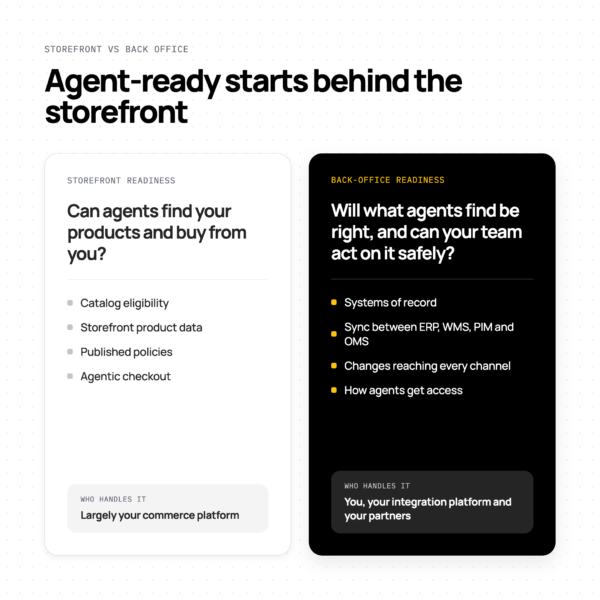
| Storefront readiness | Back-office readiness | |
|---|---|---|
| The question | Can agents find your products and buy from you? | Will what agents find be right, and can your team act on it safely? |
| What it covers | Catalog eligibility, storefront product data, published policies, agentic checkout | Systems of record, sync between ERP, WMS, PIM, OMS and every channel, and how agents get access |
| Who handles it | Largely your commerce platform; Shopify switches much of it on by default | You, your integration platform and your partners |
Which AI agents need your back-office data?
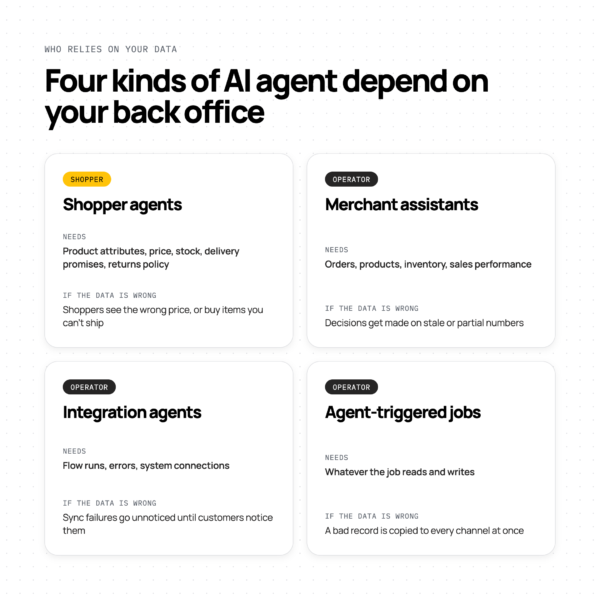
Two groups of agents rely on your back office. Shopper agents, such as ChatGPT, Gemini and Copilot, read your product, price, stock and policy data to recommend and sell. Operator agents, used by your own team, read that data and change it: updating products, checking orders and fixing stock. Both fail in the same way when the data is wrong.
| Agent |
What it does
|
Data it needs | When the data is wrong |
|---|---|---|---|
| Shopper agents (AI shopping assistants) |
Find, compare and buy products for shoppers
|
Product attributes, price, compare-at price, stock, delivery promises, returns policy
|
Shoppers see the wrong price, or buy items you can’t ship
|
| Merchant assistants (Claude, ChatGPT and others connected to your store) |
Let your team ask questions and make changes from a chat
|
Orders, products, inventory, sales performance
|
Decisions get made on stale or partial numbers
|
| Integration agents (such as Patchworks AI Agents) |
Build, monitor and fix the integration flows that move your data
|
Flow runs, errors, system connections
|
Sync failures go unnoticed until customers notice them
|
| Agent-triggered jobs |
Run a defined job when an agent asks, or on a schedule
|
Whatever the job reads and writes
|
A bad record is copied to every channel at once
|
For most retailers, operator agents are the bigger opportunity in the near term: work behind the checkout, in pricing, product updates, fulfilment and finance. Our AI in retail video series explains why, with Snag’s CTO and Patchworks’ CEO.
What data do AI agents need, and which system owns it?
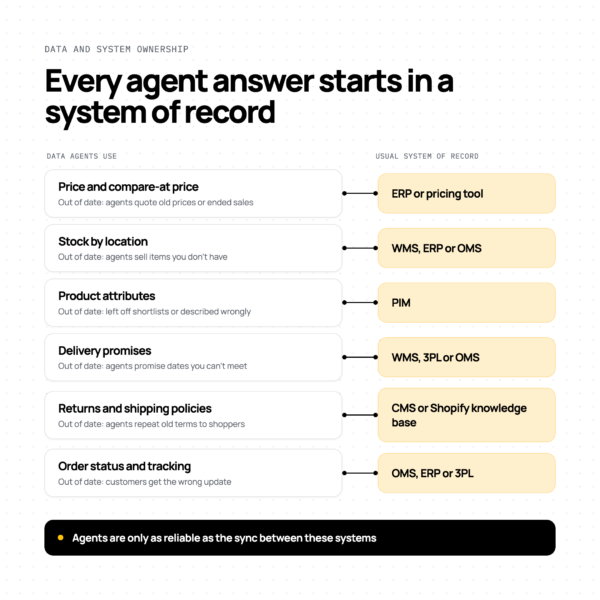
AI agents need accurate price, compare-at price, stock by location, product attributes, delivery promises, store policies and order status. In most mid-market retail stacks, each of these is owned by a different system, such as the ERP, warehouse management system (WMS), product information management (PIM) system or order management system (OMS), rather than the storefront. Agents are only as reliable as the sync between them.
| Data agents use |
Usual system of record
|
What goes wrong if it’s out of date |
|---|---|---|
| Price and compare-at price |
ERP or pricing tool
|
Agents quote old prices, or show a sale that has ended
|
| Stock by location |
WMS, ERP or OMS
|
Agents sell items you don’t have, or hide items you do
|
| Product attributes (sizes, materials, care, safety information) |
PIM
|
Products are left out of agent shortlists, or described wrongly
|
| Delivery promises and fulfilment locations |
WMS, 3PL or OMS
|
Agents promise delivery dates you can’t meet
|
| Returns, shipping and other policies |
CMS, or the Shopify knowledge base
|
Agents repeat out-of-date terms to shoppers
|
| Order status and tracking |
OMS, ERP or 3PL
|
Customers get the wrong update, and your team chases the wrong order
|
The fix is unglamorous. Decide which system owns each type of data, then make sure every change reaches every channel agents read, quickly enough to matter. Stock is usually the hardest, because it changes constantly and often lives in more than one place (see inventory and stock synchronisation). Product data is next: a PIM helps, but only if its data reaches every channel.
Snag’s co-founder and CTO, Tom Martin, puts integration at around 30% of the challenge. The other 70% is data and process work: choosing one system of record for orders and products, and agreeing what an order or a product actually is.
of UK retail leaders describe their integration setup as fully connected and scalable.
want to use AI in their tech stack but say they can’t.
Read the Retail Integration Maturity Model report and take its free self-assessment.
What is MCP, and how does it connect agents to retail systems?
Model Context Protocol (MCP) is an open standard, introduced by Anthropic in November 2024, that lets AI assistants such as Claude and ChatGPT discover and use tools in other systems (modelcontextprotocol.io). An MCP server decides which tools an assistant can see, such as “look up an order” or “update stock”, and usually calls each system’s API to carry them out.
For retailers, two questions matter more than the protocol itself: which tools does an MCP server expose, and how many of your systems can it reach? We explain how MCP and APIs fit together in MCP vs API: what’s the difference for retail and ecommerce?
One MCP per tool, or orchestration across the stack?
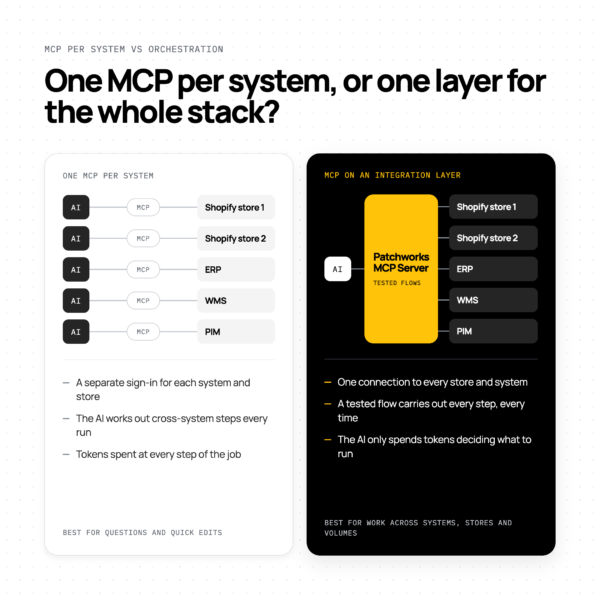
Most software vendors now offer their own MCP server or AI connector, so it’s tempting to connect each system to your AI assistant one by one. That works well for questions about a single system. But most retail jobs span systems and stores, and per-system connectors leave the AI to stitch them together each time. An integration layer with its own MCP server does that work once, consistently.
|
One MCP per system
|
MCP on an integration layer | |
|---|---|---|
| Connections |
One per system, sometimes one per store. Shopify’s AI connectors work with one store at a time, even when stores are in the same organisation.
|
One connection to a platform that already connects every store and system
|
| What the AI can do |
Whatever each vendor chose to expose, which is often less than its full API
|
The jobs you define, built on each system’s API
|
| Jobs across systems |
The AI works out the steps across systems every time
|
A tested flow carries out every step
|
| Bulk changes |
Often one item at a time. Shopify’s connectors change items one by one, and a large batch can stop partway.
|
Bulk updates run as a single job through each system’s bulk APIs
|
| Cost |
Tokens at every step, rising with the length of the job
|
The AI only spends tokens deciding what to run; the flow does the rest
|
| Consistency |
Can vary from one run to the next
|
Same job, same steps, every time
|
| Visibility |
Spread across each vendor’s tools
|
Integration runs monitored in one platform
|
Per-system connectors aren’t the wrong choice. They’re designed for a person working in one system, and many of their limits are deliberate safety choices: Shopify’s AI connectors can’t issue refunds or cancel orders, even with write access. Use them for questions and quick edits. Use an integration layer for anything that crosses systems, stores or volumes. Our guide to Shopify MCP and AI connectors covers Shopify’s tools in detail.
“The difference in cost between me being able to execute a job in 1,000 tokens versus 2 million tokens is huge.”
Tom Martin
CTO for Snag
How do you keep AI agents safe in your back office?
Keep AI agents safe by limiting what they can see and do, starting with read-only access, routing changes through tested flows, and keeping people responsible for decisions. Treat an agent like a new member of staff with a narrow job description, not like an administrator.
- Do give each agent only the tools its job needs. Don’t connect agents with broad, shared credentials.
- Do start read-only, and add write access one job at a time. Don’t approve write access just because a tool asks for it. On Shopify, the only way to reduce an AI tool’s access afterwards is to uninstall it and install it again.
- Do route changes to prices, stock and orders through tested integration flows. Don’t let an agent improvise multi-step changes in live systems.
- Do use AI to give people better information, faster. Don’t hand decisions to a large language model (LLM).
- Do review what agents have changed. Don’t assume your platform checks it for you. Shopify, for example, states that actions connected AI tools take aren’t reviewed or approved by Shopify.
- Do use AI before peak to fix the issues you already know about. Don’t let an LLM run anything during peak trading: that’s a job for properly scaled systems.
More on accountability in who should own AI in a retail business, and on getting your stack ready for peak in our peak season readiness guide.
How do you make your back office agent-ready? A checklist
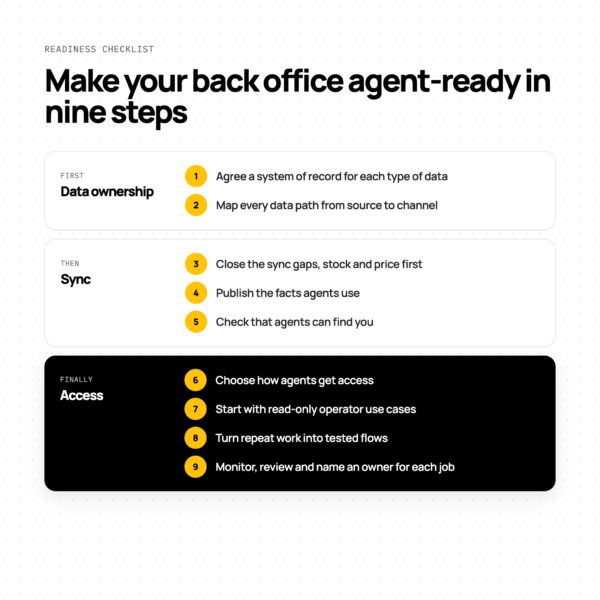
Start with data ownership, then sync, then access. Most of the work happens before any agent is switched on.
- Agree a system of record for each type of data. Decide where price, stock, product and order data is mastered, so there is one right answer to every question an agent asks.
- Map every data path. Trace how each type of data travels from its source to your storefronts, marketplaces and agent channels, and where it waits in a queue or a spreadsheet.
- Close the sync gaps. Fix the slowest and least reliable paths first, usually stock and price, so agents see what customers can actually buy.
- Publish the facts agents use. On Shopify, review and publish your knowledge base (Sales channels > Agentic), so agents quote your real returns, shipping and gift policies.
- Check that agents can find you. Shopify’s admin now shows whether your store is eligible for Shopify Catalog, and links to fixes for anything in the way.
- Choose how agents get access. Use per-system connectors for single-system questions, and an integration layer with an MCP server for work across stores and systems.
- Start with read-only operator use cases. Reports, order lookups and stock checks build trust before agents change anything.
- Turn repeat work into tested flows. Once a job works, make it a flow the agent triggers, so it runs the same way, at a known cost, every time.
- Monitor and review. Check what ran and what changed, and keep a named person accountable for each agent’s job.
Not sure where to start? The Retail Integration Maturity Model report includes a free self-assessment that shows which stage your business is at.
What does an agent-ready stack look like in practice?
Snag runs six Shopify storefronts and five warehouse management systems, and sells to customers in more than 100 countries. Instead of logging into each system, Snag’s team tells an LLM what it wants done. Patchworks connects the systems and carries out the work, turning that request into the precise instructions that Shopify, the warehouses and the finance system understand.
- 14,000+ products updated in a single operation
- ~2 weeks from concept to live for one of Snag’s fastest product launches
- 10–12 connectors built by Snag’s own team, most live within hours
- Minutes, not a day: preparing a launch across six storefronts
Snag and Patchworks were joint winners of the 2026 MACH Impact Award.
or watch the three-part AI in retail series.
Where does Patchworks fit?
Patchworks is a retail-first, AI-native integration platform (iPaaS) that supports MCP. Its hosted MCP server lets AI assistants such as Claude and ChatGPT work with your connected systems through one controlled layer, and Patchworks AI Studio lets teams build and manage integration flows from plain-English prompts.
- Patchworks MCP Server: hosted and ready to use with a set of default tools, and extendable with your own tools for the jobs your team runs. Connection guides cover Claude and ChatGPT. Explore the MCP Server
- Patchworks AI Studio and AI Agents: build live process flows, monitor them and fix errors from plain-English prompts. See AI Studio and AI Agents
- Connectors and Connector Builder: prebuilt connectors talk directly to each system’s API, and Connector Builder creates a connector for any system with an API.
- Built for retail: Patchworks connects ecommerce, ERP, warehouse, 3PL, marketplace and finance systems, and keeps orders, stock and product data moving between them. New to integration platforms? Start with what is iPaaS?
Patchworks is used by 2,000+ brands, is Shopify’s only Certified Technology Partner for integrations, is ISO 27001 certified, and won the 2026 MACH Impact Award with Snag.