Summary
Fashion variants stay consistent when every system agrees on one SKU rule and one set of size and colour values. This guide is for ecommerce and IT owners at fashion retailers and brands. It covers structure, flow and testing between a product information management (PIM) system, an enterprise resource planning (ERP) system and Shopify.
Why are product variants hard to sync between a PIM, ERP and Shopify?
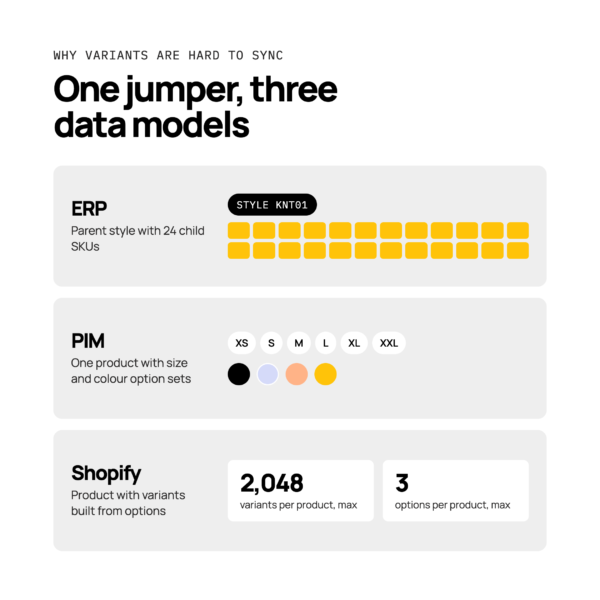
Each system models a variant differently, so the same jumper can look like three different things in three places.
Take a knitwear style that comes in six sizes and four colours. The ERP holds a parent style with 24 child SKUs.
The PIM holds one product with option sets for size and colour. Shopify holds a product with variants built from options.
Those structures describe the same stock, but they don’t match one to one. A sync has to translate between them every time something changes.
Shopify also limits each product to 2,048 variants and three options, according to Shopify’s help centre. Styles with long size runs and many colours reach those limits first, so allow for them in your structure from the start.
Where variant data usually breaks
Variant data usually breaks where one system’s values stop matching another’s. Four failures show up most often.
- Mismatched SKUs. The ERP SKU and the Shopify variant SKU differ by a character, so stock updates never find their target.
- Missing size values. A size exists in the ERP but not in the PIM, so the variant never reaches the storefront.
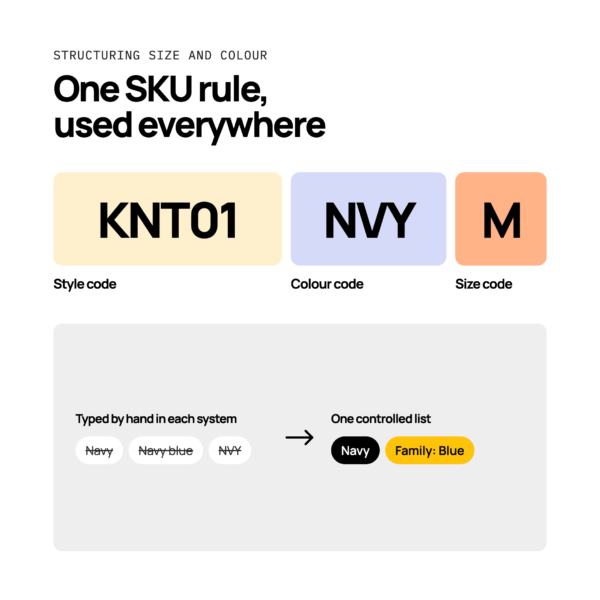
- Colour names that differ per system. “Navy”, “Navy blue” and “NVY” become three colours and three filters.
- Duplicate products. A style is created twice, once per system, and the two listings compete.
For shoppers, this means broken listings, sizes that look in stock but aren’t, and filters that miss products. For operations, it means orders that fail to create in the ERP or ship the wrong variant. For the full list, read seven product data errors that break orders and listings.
How should size and colour data be structured?
The most reliable model uses size as the variant, with a single SKU rule applied everywhere. Hold one product per style and colour, or one per style.
Pick one model and use it for every style. One product per style and colour gives each colour its own images and page. One product per style keeps everything on one page, with colour as a second option.
Either works. Mixing them doesn’t.
Your SKU rule should be readable and fixed, for example style code, colour code and size code. Write it down and apply it in every system.
Three habits keep the data clean:
- Controlled value lists. Size and colour values come from a fixed list, not free text.
- Size scales by region. Hold UK, EU and US sizes as separate, linked values so one variant can serve several markets.
- Colour name and colour family. Keep the marketing name (“Midnight”) for display and a simple family (“Blue”) for filtering.
Do and don’t:
- Do define your SKU rule before the first style is created.
- Do keep size and colour values on controlled lists.
- Don’t type colour names by hand in each system.
- Don’t create a new product per size.
Which system should own product data is a separate question, covered in PIM vs ERP.
Mapping PIM attributes to Shopify options and metafields
Each PIM attribute should land in one clear place in Shopify, decided before launch.
In broad terms, attributes that shoppers choose between, such as size and colour, become Shopify options. Attributes that describe the product, such as fabric, care instructions or fit notes, usually become metafields or part of the description. Colour family often sits in a metafield or tag so it can drive filters.
Write a simple mapping table: PIM attribute, Shopify destination, allowed values. Review it with both your ecommerce and IT teams.
How do seasonal drops affect the product data flow?
Seasonal drops raise volume and add time pressure, so product data must be complete and approved before launch, not on launch day.
A drop is peak trading for your catalogue. Hundreds of new variants arrive at once, and any gap is visible fast. Calm, risk-reducing practice beats last-minute fixes.
Plan for five situations:
- New season styles. Create them early, with full size runs, and approve them before the launch date.
- Carry-over lines. Check that existing SKUs keep their identity, so history and stock don’t reset.
- Scheduled publishing. Load products as drafts and publish on a schedule, so launch needs no manual step.
- End-of-season archiving. Archive sold-out styles rather than deleting them, so SKUs aren’t reused by mistake.
- Markdowns. Change prices as a controlled update, not a late edit to live products.
Sending the same product data to marketplaces is a separate task. Read syndicating product data to marketplaces.
How do you sync stock by variant?
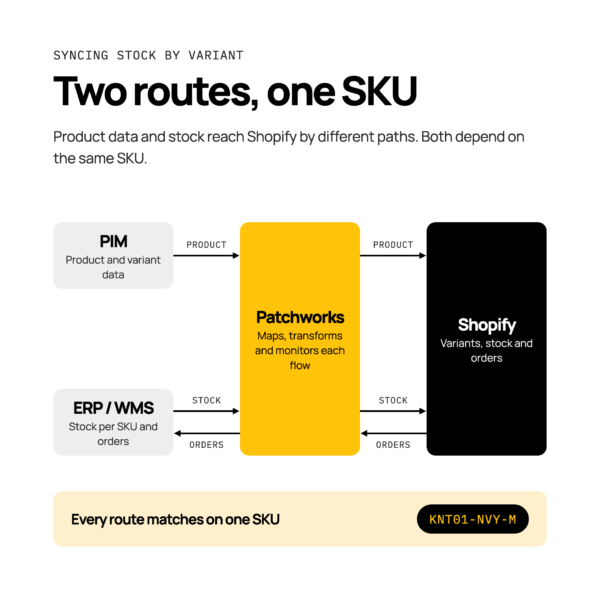
Stock is held per SKU in the ERP or warehouse management system (WMS), and each SKU’s quantity updates the matching Shopify variant.
Two events matter most. When an order is placed in Shopify, the order should be created in the ERP and the available quantity for that SKU should fall. When stock is received, the ERP or WMS quantity rises and Shopify shows the new availability for that variant.
Stock and product data often take different routes. Product data may flow from the PIM to Shopify, while stock flows from the ERP or WMS to Shopify. Both routes depend on the same SKU, which is why one SKU rule matters so much.
Patchworks is the retail-first, AI-native orchestration layer for retail tech stacks, and an iPaaS (integration platform as a service). It coordinates these flows in one place, instead of a tangle of separate connections.
For a worked pairing, see the Shopify and NetSuite Integration Pair.
What should you test before launch?
Test the full path from PIM to Shopify and back to the ERP with realistic styles before any drop goes live.
Run these checks:
- Check that every SKU matches across the PIM, ERP and Shopify.
- Create a new style with a full size run and confirm every variant appears.
- Add a colour to an existing style later and confirm it joins the right product.
- Set a variant to out of stock and confirm Shopify shows it correctly.
- Test a style that sits at the variant and option limits.
- Place a test order and confirm it is created in the ERP with the right variant.
- Receive stock in the ERP or WMS and confirm the quantity returns to Shopify.
Add monitoring on top of testing, so someone sees a failed sync before customers do. Testing lowers risk, but it doesn’t remove the need to watch live flows.
How Patchworks helps keep variant data consistent
Patchworks helps you launch seasons with fewer broken listings and fewer manual fixes, by coordinating product, order and stock data across your tech stack.
Patchworks sits at the centre of your PIM, ERP, WMS and Shopify, and moves data between them with monitoring and visibility. Its data transformations reshape values from one system so they arrive in the form another expects.
AI Studio is our AI layer: a suite of agents that understand your integration context and help you build, run and operate integrations faster. You describe what you need in plain English, and your team stays in control. Read more in using AI Studio agents to build and monitor PIM integrations.
Patchworks is used by 2,000+ brands and is Shopify’s only Certified Technology Partner for integrations. See how we work with fashion brands on our fashion and apparel page, or read our guide to PIM integration.