Summary
The product data errors that cost most are the ones that stop an order being created, shipped or listed. Most start as small mismatches between systems, and they surface as failed orders, hidden listings and wrong stock.
This guide to product data quality in ecommerce is for ecommerce managers, operations leads and heads of IT. It covers seven errors, why they happen and how to catch them early.
Which product data errors cost retailers most?
The errors that cost most are the ones that stop an order being created, shipped or listed. A wrong SKU or a missing mandatory field blocks revenue directly. A broken image link usually costs less, but still hurts conversion.
The seven errors below are:
- SKU mismatches between systems.
- Variant and option mismatches.
- Missing required attributes.
- Inconsistent units, formats and values.
- Stale or conflicting prices and stock-related fields.
- Duplicate or orphaned product records.
- Broken or missing images and content links.
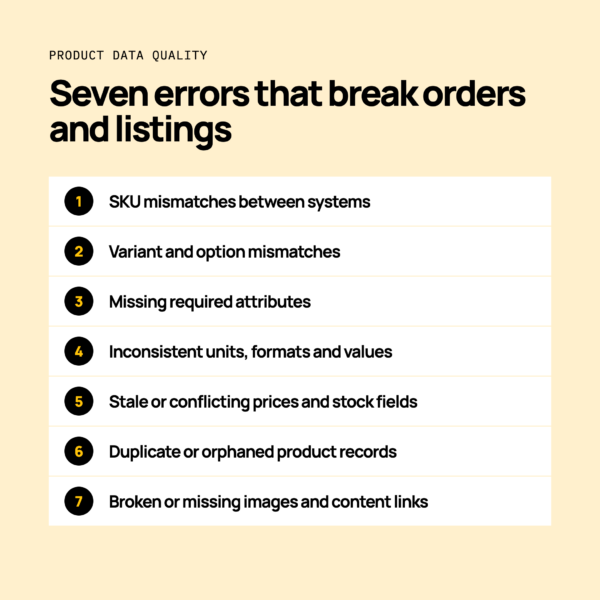
The seven product data errors that break orders and listings
Each error below covers what goes wrong, what you see and what should happen when the data is right.
SKU mismatches between systems
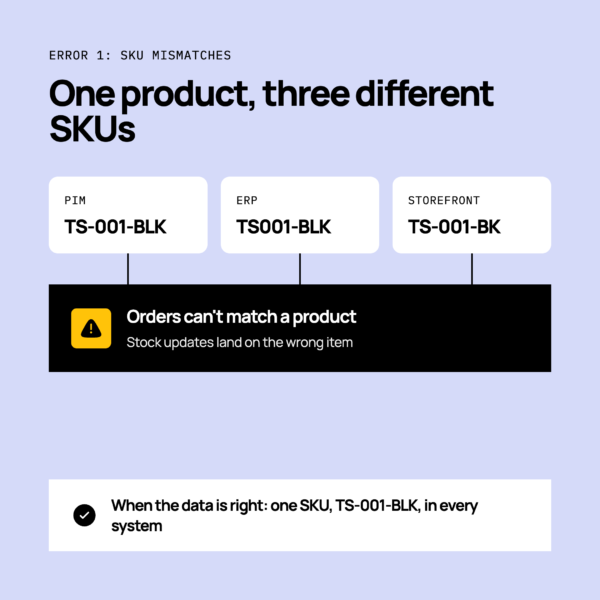
The same product carries different SKUs in the product information management (PIM) system, the enterprise resource planning (ERP) system and the ecommerce platform. Orders then fail to match a product, or stock updates land on the wrong item.
Your operations team sees orders stuck in an error queue. Customers buy items you can’t fulfil.
When the data is right, an order for SKU TS-001-BLK in your store is created against the same SKU in your ERP. Stock then updates back to the right item.
Variant and option mismatches
Size, colour and parent-child structure differ between systems. Variants disappear from the storefront, or stock attaches to the wrong variant.
In fashion, a jumper might be “M” in one system and “Medium” in another. Customers see the size as sold out while the warehouse holds stock.
When the data is right, every size and colour sits under one parent and keeps the same option values everywhere. For more, read managing fashion product variants.
Missing required attributes
Marketplaces and storefronts reject or hide listings when mandatory fields are empty. Typical gaps are brand, category, material or a product identifier.
Your team sees rejection notices or products that never appear. Customers can’t find the item.
When the data is right, a product only goes live once every required field is filled.
Inconsistent units, formats and values
Weights, dimensions, currencies or sizing conventions differ between systems. Shipping rates are miscalculated, prices display wrongly or filters return odd results.
A weight held in grams in the PIM but read as kilograms by the warehouse management system (WMS) is a classic case. Parcels get the wrong carrier service.
When the data is right, each field uses one agreed unit and format, converted as it moves between systems.
Stale or conflicting prices and stock-related fields
A product record is updated in one system and not another. The wrong price or availability stays live.
Your team sees a promotional price still showing after the sale ends. Customers see a product as available when it isn’t.
When the data is right, a change in the source system reaches every channel, and a failed update is flagged.
Duplicate or orphaned product records
Duplicates cause double listings. Records with no parent cause orders that can’t be fulfilled.
A duplicate created during a CSV import can split sales and stock across two records. An orphaned variant may sell but never appear in the pick list.
When the data is right, each product has one record and every variant points to a valid parent.
Broken or missing images and content links
Missing media or bad URLs leave listings incomplete or rejected. Customers see blank image slots, and marketplaces may refuse the listing.
When the data is right, every image URL resolves and each product has its required media before it publishes.
How do SKU and variant mismatches happen?
SKU and variant mismatches happen when systems each create or edit product identifiers independently, often after manual edits, imports or a system change. Four causes come up again and again:
- Manual CSV edits. A spreadsheet changes a SKU in one system but not the others.
- A new system added. A marketplace, third-party logistics (3PL) provider or point of sale (POS) system arrives with its own identifiers.
- Replatforming. Product structures are rebuilt and identifiers shift.
- No agreed owner of the product record. Several teams edit the same data.
To agree who owns each field, read PIM vs ERP: which system should own your product data?
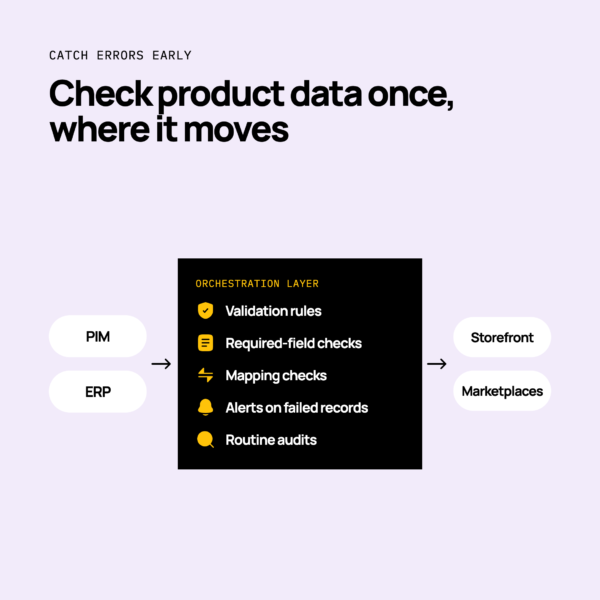
How do you catch product data errors before customers do?
You catch product data errors by validating data at the point it moves between systems and by monitoring every flow. Checks inside one system miss problems created in transit.
- Validation rules. Reject values outside agreed formats, such as a weight in the wrong unit.
- Required-field checks. Block a record from publishing when mandatory attributes are empty.
- Mapping checks. Confirm SKU, option and category fields map to the right target field.
- Alerts on failed records. Tell someone when a product fails to sync.
- Routine audits. Check a sample of SKUs across systems on a regular schedule.
An orchestration layer sits at the centre of the stack and moves product data between systems in one place. You can then apply these checks once, not in every connection.
How does monitoring help with product data quality?
Monitoring shows failed or partial product syncs as they happen, so your team fixes them before orders or listings are affected. Without it, a bad sync can sit unnoticed for weeks.
Good monitoring gives you three things:
- Visibility. You see which flows ran and which didn’t.
- Alerts. The right person hears about a failure quickly.
- A clear record. You can see what failed and why.
Most peak trading failures start weeks earlier, in integrations nobody is monitoring. Monitoring helps you spot them in time.
Product data checklist: do and don’t
A product data checklist should cover identifiers, required fields, units, ownership and monitoring. Each pair below stands alone.
- Do agree how SKU fields map between systems before you launch. Don’t hand-edit spreadsheets in your busiest weeks.
- Do keep one agreed option value for each size and colour. Don’t let each system invent its own.
- Do make mandatory attributes required before a product can publish. Don’t discover gaps through marketplace rejections.
- Do agree one unit for weight, dimensions and currency. Don’t convert by hand.
- Do change prices and stock-related fields in the source system. Don’t let a second system overwrite them.
- Do check for duplicates after every import. Don’t leave orphaned variants in the catalogue.
- Do alert on failed product records. Don’t wait for a customer to report them.
- Do name an owner for the product record. Don’t leave it shared by default.
How Patchworks helps keep product data consistent across your tech stack
Patchworks keeps product data consistent by moving it between your PIM, ERP, ecommerce platform and marketplaces from one place, with monitoring and visibility. Patchworks is the retail-first, AI-native orchestration layer for retail tech stacks, used by 2,000+ brands.
Prebuilt connectors and a low-code flow builder mean less custom code for you to maintain. Our connectors move orders, stock and product data between platforms such as Magento and BigCommerce and the rest of your stack.
For the wider picture, read our guide to PIM integration.