Shopify MCP is the set of Model Context Protocol (MCP) servers and AI connectors that Shopify provides. Some help shoppers’ AI agents find and buy your products. Others let your team run your store from AI tools such as Claude and ChatGPT. They work inside Shopify, one store at a time. Work that spans several stores, or systems such as your ERP and warehouse, needs an integration layer.
Updated November 2026, after Shopify’s Fall ’26 Edition.
Key takeaways
- Do use Shopify’s official AI connectors for questions and small edits in one store. Don’t use them for bulk changes: they update items one at a time.
- Do publish your knowledge base and check your Shopify Catalog eligibility, so shopping agents get accurate facts. Don’t rely on older Storefront MCP guides: Shopify has moved its catalog and cart tools.
- Do keep price and stock accurate in the systems that own them, usually your ERP and warehouse. Don’t expect Shopify’s tools to see data that lives outside Shopify.
- Do connect AI through an integration layer when work spans stores or systems. Don’t reconnect store by store for every multi-store task.
Which Shopify MCP or AI tool does what? (November 2026)
| Tool |
Who it’s for
|
What it does | Reaches your back office? |
|---|---|---|---|
| Shopify connectors for AI agents |
Merchants and their teams
|
Manage products, inventory, orders and performance from an AI chat, in ChatGPT, Claude, Gemini, Copilot, Grok, Perplexity, Muse and others
|
Shopify data only, one store at a time
|
| Storefront Catalog, Cart and Checkout MCP (UCP) |
Developers building AI shopping agents
|
Search a store’s products, build carts and hand over to checkout
|
No: shopper-facing
|
| Policies and FAQs tool |
AI shopping agents
|
Answers questions about a store’s policies and FAQs
|
No: shopper-facing
|
| WebMCP tools on storefronts and checkout |
Browser-based AI agents
|
Search products, update the cart and complete checkout once the buyer approves
|
No: shopper-facing
|
| Shop.dev |
Developers building shopping apps and agents
|
One connection to Shopify Catalog, sign-in with Shop, cart, checkout and Shop Pay
|
No: shopper-facing
|
| Dev MCP and the AI Toolkit |
Developers building apps and themes
|
Give AI coding assistants Shopify’s developer resources, including app security checks
|
No: for building stores and apps, not running them
|
| Knowledge base (not MCP, but agents rely on it) |
Merchants
|
Controls the store facts agents receive, such as return windows and shipping destinations
|
Indirectly: you publish the facts
|
What is Shopify MCP?
MCP (Model Context Protocol) is an open standard that lets AI assistants discover and use tools in other systems. “Shopify MCP” isn’t one product. It’s the collective name for Shopify’s MCP servers and AI connectors, which have been added, renamed and reorganised several times through 2025 and 2026. (For how MCP relates to APIs, see MCP vs API: what’s the difference for retail and ecommerce?)
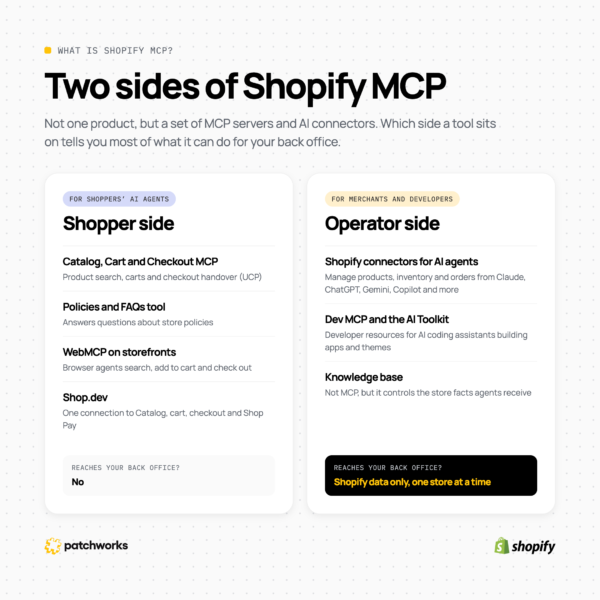
Most of Shopify’s tools fall into one of two groups. Shopper-side tools let AI agents find, compare and buy products for shoppers. Operator-side tools let merchants, their teams and developers run and build stores from AI tools. Knowing which group a tool belongs to tells you most of what it can and can’t do for your back office.
If you’ve read about Storefront MCP, note that Shopify has since removed its catalog and cart tools. They now live in Storefront Catalog MCP, Cart MCP and Checkout MCP, which are part of Shopify’s Universal Commerce Protocol (UCP). Only the policies and FAQs tool remains on the original endpoint.
What do Shopify’s MCP servers do for shoppers’ AI agents?
On the shopper side, Shopify does most of the technical work for you. Its Fall ’26 Edition added tools to every Liquid and Hydrogen storefront and checkout that let browser agents search products, update carts and complete checkout once the buyer approves. In Shopify’s words, every Shopify store is now agent-ready by default.
AI agents including ChatGPT and Microsoft Copilot get product information from Shopify Catalog, and developers can connect any agent or app to Catalog, cart, checkout and Shop Pay through Shop.dev. What’s left for merchants is the information agents receive:
- Catalog eligibility. Shopify’s admin now shows whether your store is eligible for Shopify Catalog, with links to fix anything in the way.
- Your knowledge base. At Sales channels > Agentic, you review and publish the facts agents get about your store, such as return windows, shipping destinations and gift services. Shopify drafts them from your storefront, but nothing reaches an agent until you publish it.
- The accuracy of your data. Agents read the price, compare-at price and stock that Shopify holds. If those are out of step with your ERP or warehouse, agents pass the error on. Our guide to an agent-ready back office covers which system should own each type of data.
How do you connect Claude or ChatGPT to your Shopify store?
Use Shopify’s official integration for your AI tool. You install it from inside the AI tool, not from the Shopify App Store, then approve the level of data access it asks for in your Shopify admin. After that, you can ask questions about your store and make changes in the chat, within the access you’ve approved.
Shopify’s integrations cover ChatGPT, Claude, Claude Duet, Microsoft Copilot, Google Gemini, Grok, Grok Bot, Muse and Perplexity. For step-by-step instructions for each tool, see Shopify’s guide to building and managing your store with third-party AI tools.
They work well for questions about sales, products, orders and stock, for drafting or tidying product listings, and for small edits. Two things to know before you start:
- Approve write access only when you need it. Read-only access lets the tool view data without changing it. You can’t lower an access level later without uninstalling the integration and installing it again.
- Use a staff account with limited permissions. A tool can only do what the staff account it works through is allowed to do, so a narrow account means a narrow tool.
What can’t Shopify’s AI connectors do for back-office work?
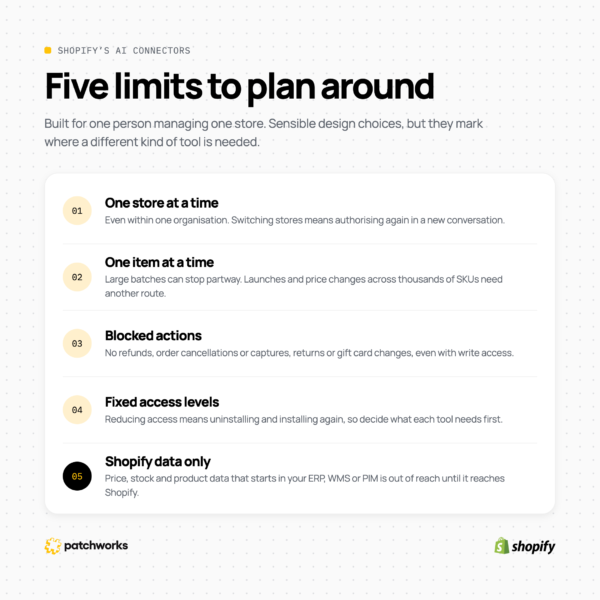
Shopify’s AI connectors are designed for one person managing one store. Shopify’s Help Center sets out the limits: they connect to one store at a time, change items one at a time, and can’t move money or change paid orders. They also work only with the data held in the Shopify store you connect.
| Limit |
What Shopify documents
|
What it means for a retail operations team |
|---|---|---|
| One store at a time |
Integrations connect one store at a time, even when stores are in the same organisation. Switching disconnects the current store, starts a new authorisation, and needs a new conversation.
|
Brands with regional or brand-specific stores can’t work across them in a single task.
|
| One item at a time |
A connected tool changes items one at a time, so a large batch can stop partway, and some actions cover only a limited number of items.
|
Range launches, price changes and catalogue clean-ups across thousands of SKUs need another route.
|
| Blocked actions |
Tools can’t issue refunds, cancel or capture orders, mark orders as paid, process returns, or create or adjust gift cards, even with write access.
|
Order and returns operations stay in your admin or in the systems that manage them.
|
| Fixed access levels |
To reduce access after approving it, you uninstall the integration and install it again.
|
Decide the access each tool needs before you approve it.
|
| Shopify data only |
Integrations read and edit data in the store you connect.
|
Price, stock and product data that starts in your ERP, WMS or PIM is out of reach until it reaches Shopify.
|
These are sensible design choices, not flaws. A tool that anyone can install from a chat window shouldn’t be able to refund orders or rewrite a whole catalogue in one go. Shopify also points out that it doesn’t review or approve the actions connected AI tools take, and that you’re responsible for any changes they make. But the limits do mark where a different kind of tool is needed.
Where does the data AI agents use actually come from?
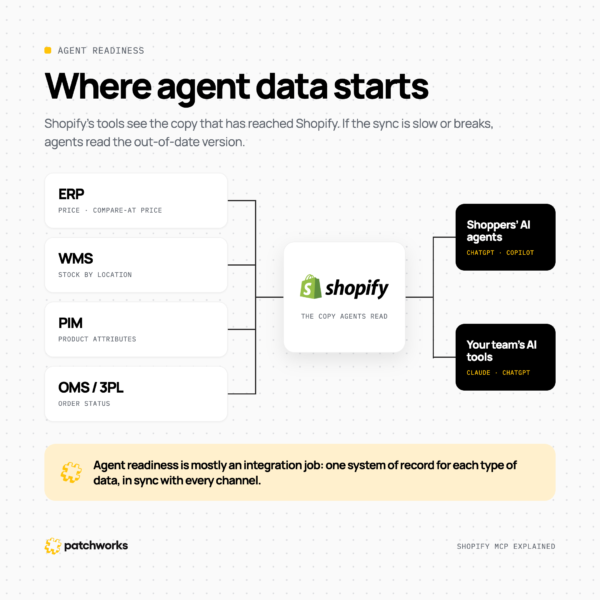
In most mid-market retail stacks, the data AI agents rely on doesn’t start in Shopify. Price and compare-at price usually come from the ERP, stock by location from the warehouse management system (WMS), product attributes from the product information management (PIM) system, and order status from the order management system (OMS) or 3PL.
Shopify’s tools see the copy of that data that has reached Shopify. If the sync is slow or breaks, agents read the out-of-date version, whether they’re helping a shopper or your own team. That makes agent readiness mostly an integration job: one system of record for each type of data, kept in sync with every channel. See how Patchworks keeps Shopify connected to your ERP, warehouse and finance systems
How do you run AI agents across multiple Shopify stores and systems?
Connect your AI assistant once, to an integration layer that already connects every store and system, rather than to each store separately. Make the jobs your team runs, such as a price update or a product launch, available as MCP tools, and let the integration layer carry them out as tested flows, using Shopify’s bulk APIs for large changes instead of editing items one by one.
- The integration platform connects each Shopify store, plus your ERP, warehouses, PIM and finance systems.
- Its MCP server gives your AI assistant a set of tools, one for each job, that work across all of them.
- You ask for what you want in plain English, and the assistant picks the right tool.
- A tested flow does the work the same way every time, and runs are monitored in one place.
Snag runs six Shopify storefronts and five warehouse management systems. With vendor MCP connectors, each connection signed in as an individual user, so working across six stores meant re-authenticating every time. Snag now works through the Patchworks MCP Server, and used a Patchworks flow to update more than 14,000 products in a single operation through Shopify’s Bulk Operations API. Preparing a launch across all six storefronts used to take a day of its CTO’s week. It now takes minutes.
Where does Patchworks fit?
Patchworks is a retail-first integration platform (iPaaS) and Shopify’s only Certified Technology Partner for integrations. It connects your Shopify stores to your ERP, warehouse, PIM, 3PL and finance systems, and its hosted MCP server lets AI assistants such as Claude and ChatGPT work across all of them through one controlled layer.
- Shopify integrations: prebuilt connectors for Shopify and the systems around it. Explore Shopify integrations
- Patchworks MCP Server: hosted, with default tools you can extend with your own, and connection guides for Claude and ChatGPT. Explore the MCP Server
- Ready-made pairings: accelerators for common combinations, such as Shopify and NetSuite.
Patchworks is used by 2,000+ brands and is ISO 27001 certified.