Most retail replatforms don’t slip because of the storefront. They slip because of the ERP that should be powering them. Here’s how digital and ecommerce agencies can scope, plan and deliver ERP integrations with confidence, online and in store.
If you run an agency, you probably own the storefront, the theme, the checkout and the customer experience. The ERP usually belongs to someone else. Yet it’s where a retailer’s commercial truth lives: stock, prices, orders and finance. When a project runs late or over budget, the cause is rarely the theme. It’s often the back office.
This playbook is our answer to the question agencies ask us most: how do we get ERP integration right without becoming ERP experts? It’s vendor-neutral. Everything here applies whichever ERP your merchant runs and whichever integration approach you choose.
Key Takeaways
- Discover: ask eight plain questions, agree which system is the system of record for each type of data, and write down the edge cases.
- Scope: start with four core flows (products and prices, stock, orders, shipping) and build them in dependency order, reference data first.
- Before you quote: don’t commit to a price or a date until you have six things, including test access, real example orders and a signed data matrix.
- Plan: go live one flow at a time and budget for a few weeks of close monitoring afterwards.
- Partner: lead standard projects yourself; bring an integration specialist into the discovery workshop for complex ones.
Why the ERP carries most of the risk in a retail replatform
The ERP carries most of the delivery risk in a retail replatform because every other system depends on its data, and its constraints are usually discovered after the price is agreed.
It’s a wider problem than integration. Gartner predicts that by 2027, more than 70% of recently implemented ERP initiatives will fail to fully meet their original business goals. On retail projects, we see the same three patterns again and again:
- Discovered too late. ERP licences, customisations and the lack of a test environment surface after the statement of work is signed.
- Nobody owns the data. The storefront, POS, ERP and 3PL each assume they’re the master for price, stock or customers.
- Untested at peak. Volumes, timeouts and edge cases appear for the first time on Black Friday.
The good news is that all three can be caught early, and the skills that catch them are ones agencies already have: asking good questions, managing the merchant and planning the work. You don’t need to be an ERP expert to get this right.
What is an ecommerce ERP integration?
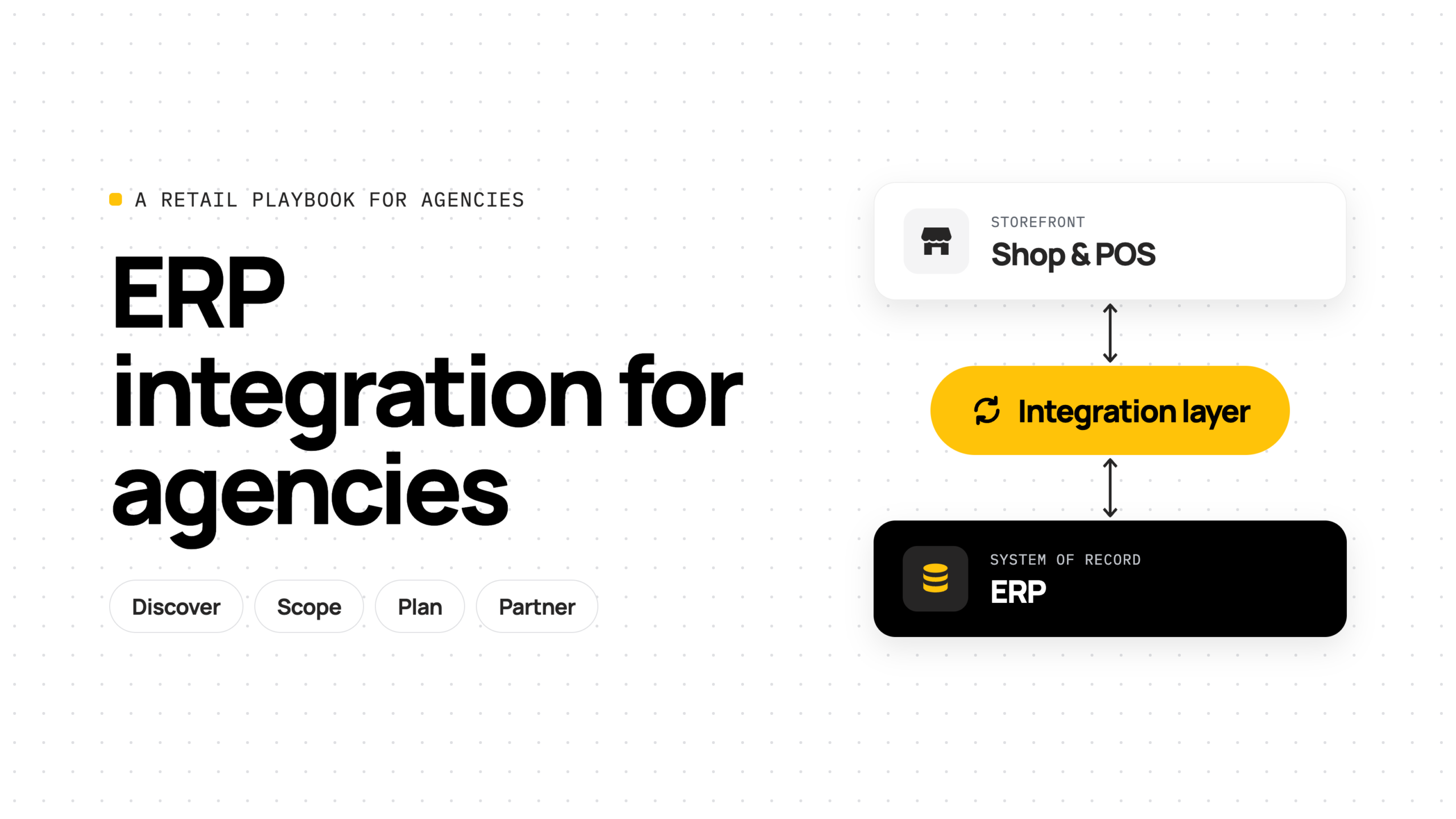
An ecommerce ERP integration automatically moves data between a retailer’s online shop (and tills in store) and its ERP, so both systems work from the same products, stock, orders and numbers.
There are three parts. The online shop is where customers browse and buy. The ERP is where stock, purchasing and accounts are run; for smaller retailers this is often an inventory or merchandise system rather than a full ERP. The integration sits between them and moves data automatically, in both directions.
| Without an integration | With an integration |
|---|---|
| Staff copy orders into the ERP by hand | Orders arrive in the ERP on their own |
| Stock is out of date, so the shop oversells | Stock is accurate across every store and the warehouse |
| Spreadsheets reconcile the numbers at the end of every day | Everyone works from the same numbers |
Is Shopify an ERP? No. Shopify is the commerce and point-of-sale platform. The ERP is normally the system of record for stock, purchasing and finance. A Shopify ERP integration (/integrations/shopify/) keeps the two in step.
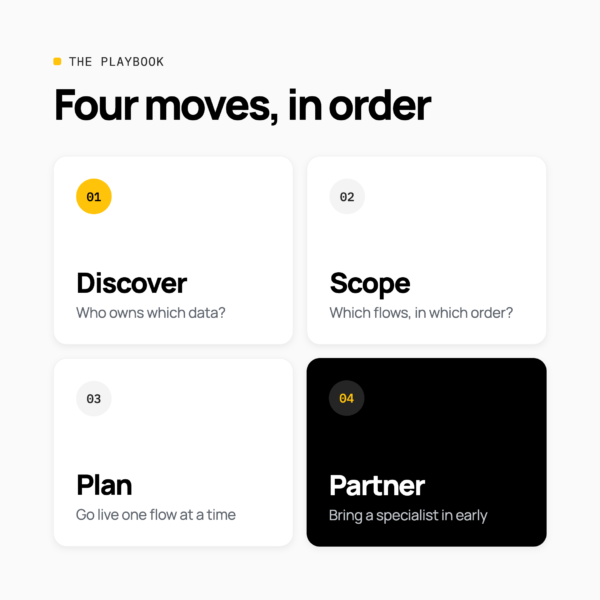
The four-move playbook: Discover, Scope, Plan, Partner
A successful ERP integration project follows four moves in order: discover the landscape, scope the flows, plan the delivery and partner with the right specialist.
- Discover. Map the merchant’s ERP landscape, who owns each type of data, and the edge cases.
- Scope. Agree the flows, their order and the risks before you price the work.
- Plan. Phase the delivery and produce the documents that take the risk out.
- Partner. Know what you can lead, and bring an integration specialist in early when you need one.
The order matters. Most of the pain on ERP projects comes from committing to scope, price and dates before discovery and scoping are done.
Step 1: Discover the merchant’s ERP landscape
Discovery for an ERP integration means finding out which systems are involved, who owns each type of data and how the business really works, before anyone agrees a price.
Eight questions for your discovery workshop
You already run discovery for the storefront. Add these eight questions and you’ll have most of what you need. None of them requires technical knowledge.
- How many orders do you take on a normal day, and on your busiest day?
- Which ERP or stock system do you use, and which version?
- Is it in the cloud, and can we have a test account?
- How many stores and warehouses hold stock?
- Where else do you sell: in store, on marketplaces, wholesale?
- How do orders get into the ERP today, and who does it?
- Who looks after the ERP: your team, or an outside partner?
- What goes wrong most often today?
A few answers matter more than they first appear. If there’s no test (sandbox) account, every test happens on live data, so plan for that. If an outside ERP partner looks after the system, any change on the ERP side is their work, their price and their timeline, so involve them early. And the last question tells you what the merchant actually cares about fixing.
If the merchant is larger, also ask: how heavily the ERP is customised and whether that’s documented; what API access, licences and connection limits apply; who signs off finance and stock; and what else touches orders and stock, such as a 3PL, WMS, PIM or marketplace tools.
Agree the system of record for each type of data
A system of record is the one system that owns a particular type of data. Every other system holds a copy. Agreeing this for each type of data is the single most useful thing you can leave discovery with.
Take this table below into your workshop and fill it in live. The right-hand column is the question that usually exposes a disagreement. Stock is the classic: is it the ERP, the WMS or the 3PL, and which locations count as sellable? On a Shopify POS project, the store rows are where ecommerce, retail operations and finance most often disagree. Get all three to sign the finished matrix.
| Data |
Usually owned by
|
Ask the merchant |
|---|---|---|
| Products and attributes |
ERP or PIM
|
Where are new SKUs created, and who enriches them?
|
| Prices and promotions |
ERP
|
Do price lists vary by channel, currency or customer group?
|
| Stock |
ERP, WMS or 3PL
|
Which stores can sell their stock online?
|
| Customers and companies |
Storefront (DTC), ERP (B2B)
|
Do trade payment terms and credit limits live in the ERP?
|
| Orders and payments |
Storefront, then copied to ERP
|
At which payment state should an order reach the ERP? Do POS sales post live or at close?
|
| Fulfilments and tracking |
ERP or 3PL, back to storefront
|
Who confirms an order has shipped? Are partial shipments allowed?
|
| Returns and refunds |
Both
|
Can online orders be returned in store? Does a store refund create a return, a credit, or both?
|
| Tenders and gift cards |
POS, then ERP
|
How do card, cash and gift card payments reach finance?
|
Ask about the edge cases, not just the happy path
The happy path (one store, one currency, order in, ship, done) is most of the volume but little of the effort. The effort lives in the edge cases:
- Stock in stores. Can store stock be sold online, or is some kept back for walk-in customers?
- Click and collect, ship from store and split fulfilment. Which store does the order, and the stock, belong to?
- Returns in store, and returns that aren’t refunds. An online order returned at the till still needs a refund in the ERP. Exchanges and parcels returned to sender need handling too.
- Bundles and gift sets. Is a gift set one product in the ERP or several, and how is its stock calculated?
- Trade customers. Do some customers get their own prices, catalogues or payment terms?
- Multiple storefronts, countries and currencies. Which storefronts, stores and tax regimes map to which parts of the ERP?
- Peak days. What happens on Black Friday, or when 500 prices change at once?
Ask about each one and write down the answer, even if it’s “not in phase one”. A real example: a retailer opened a new store, nobody added it to the integration’s location mapping, and that store’s stock quietly stopped syncing.
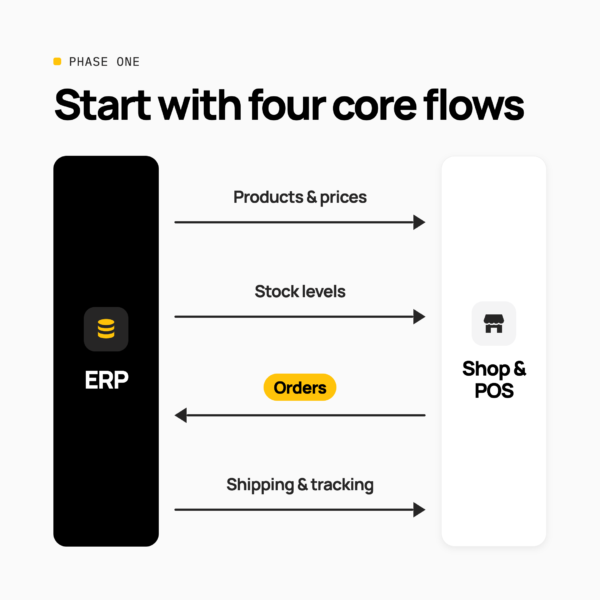
Step 2: Scope the flows, their order and the risks
Scoping an ERP integration means choosing which data flows go into phase one, agreeing the order they’re built in, and pricing the risks you found in discovery.
Start with four core flows
For most growing retailers, phase one is four flows:
| Flow | Direction | Typical timing |
|---|---|---|
| Products and prices | ERP → shop | Hourly or on change |
| Stock levels, by location | ERP, WMS or 3PL → shop | Every few minutes |
| Orders, online and in store | Shop and POS → ERP | As soon as paid, or batched at close for POS |
| Shipping and tracking | ERP or 3PL → shop | When an order ships |
Common next steps are returns and refunds, customer and trade (B2B) accounts, which often sync both ways, and marketplaces. They don’t have to be in phase one, and keeping phase one small is the easiest way to deliver on time.
For each flow, write down four things: direction, trigger (real time or scheduled), frequency and volume. That’s the skeleton of your integration spec. Shopify POS orders and returns belong to the same flows, so scope them the same way: do they post in real time or in a batch at close, and does stock update per sale or per store per day?
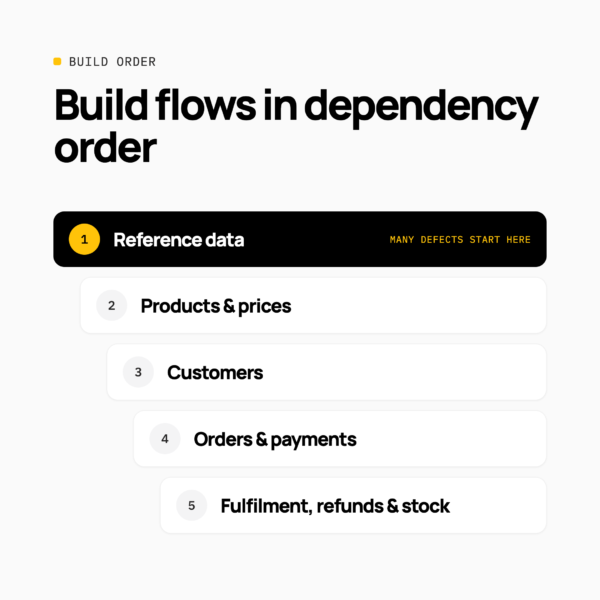
Build and test the flows in dependency order
ERP integration flows must be built in dependency order, because each flow looks up records created by the one before it. An order can’t land in the ERP if its product, customer or store doesn’t exist there yet.
- Reference data: locations, subsidiaries, tax codes, payment methods and the cross-reference tables that map them.
- Products and prices: items and variants must exist on both sides before anything can match.
- Customers: companies, contacts and payment terms, especially for B2B.
- Orders and payments: each order references products, customers and locations.
- Fulfilment, refunds and stock: each looks up an order or item that must already exist.
Many go-live defects trace back to step one: a location, tax code or SKU that exists in one system but not the other.
Five common pitfalls, and simple fixes
| Pitfall | What you see | Simple fix |
|---|---|---|
| Missing set-up data | Orders fail because a product, store or tax code is missing in the ERP | Set up stores, products and tax codes first, and test them |
| Wrong stock online | Customers buy items that aren’t really available | Agree which locations sell online, and keep a small safety buffer |
| Wrong sync timing | Stock updates too slowly, or syncs run far more often than needed | Agree timing per flow: stock often, products less often |
| Silent failures | Nobody notices a broken flow until customers complain | Send failure alerts to a named person who will act on them |
| Old and new both running | An old plug-in and the new integration both create orders | Switch the old connection off one flow at a time, on agreed dates |
None of these needs deep technical skill to avoid. They need someone to ask the question.
Example: a fashion retailer with five stores
Here’s what scoping looks like in practice. This is an illustrative example rather than a specific customer, but it’s the size of merchant many agencies work with.
The merchant: five stores and one warehouse, an online shop with tills in every store, and a cloud ERP for stock, buying and accounts. They offer click and collect and accept returns in store.
Phase one: products and prices from ERP to shop every hour; stock from all six locations every 15 minutes; orders from shop to ERP as soon as they’re paid; tracking back to the shop when an order ships.
Decided in discovery: store stock sells online, keeping two of each item back for walk-in customers; online orders returned in store are refunded at the till; a returns flow and trade customers wait for phase two.
None of those decisions needed technical knowledge. They needed the right questions, asked before the quote.
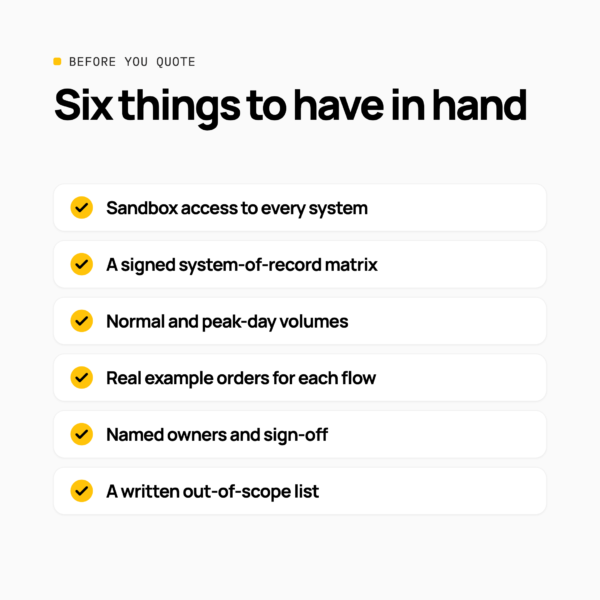
Before you quote: six things to have in hand
Don’t commit to a fixed price or a go-live date for an ERP integration until you have these six things:
- Test (sandbox) access for every system in scope.
- A signed system-of-record matrix.
- Volumes: orders on a normal day and the busiest day, plus SKUs and locations.
- Real example orders for each flow, including a return, a bundle, a discount and a split shipment.
- Named owners: the merchant’s sign-off, the ERP partner and post-go-live support.
- A written list of what isn’t in phase one.
If the merchant can’t provide them yet, that isn’t a reason to walk away. It’s a reason to sell a short, paid discovery phase first, then price the delivery once you know. Real example orders tell you more than any requirements document, and the out-of-scope list protects you as much as the in-scope one.
Step 3: Plan the delivery and build your starter kit
Plan ERP integration delivery in short phases, each ending with an output the next phase depends on, and go live one flow at a time rather than all at once.
Six phases from kick-off to hypercare
| Phase | What happens | Output |
|---|---|---|
| 1. Discover | Run the workshop, map the landscape and volumes | Signed system-of-record matrix |
| 2. Design | Agree mapping and error rules for every flow | Integration spec |
| 3. Build | Build flows in dependency order, in test environments | Working flows in sandbox |
| 4. Test | Run real example orders end to end, then merchant UAT | Signed-off test pack |
| 5. Go live | Switch over one flow at a time, with a rollback plan for each | Live flows |
| 6. Hypercare | Watch alerts closely for the first few weeks, then hand over | Runbook and support handover |
Two tips. Test with the merchant’s real orders, including the tricky ones from discovery: a return, a click and collect order, a gift set. And go live with products and stock first, then switch orders over once everyone trusts the data. Hypercare is the phase most often missing from quotes, so put it in yours.
Who leads what
| Party | Leads |
|---|---|
| Agency | Project management, the storefront build, merchant communication and UAT |
| ERP partner or merchant | ERP configuration, custom fields, scripts, licences and sign-off |
| Integration specialist | Flow design and build, monitoring and ongoing support |
Most delivery friction comes from the ERP lane belonging to nobody. Name the ERP partner early.
Your starter kit: five documents
You don’t need a heavy methodology. These five documents cover most of the risk on a retail ERP project:
- System-of-record matrix: one owner per type of data, signed by ecommerce, finance and operations.
- Integration spec: for each flow, the direction, trigger, frequency, volume, field mapping, error rules and owner.
- Cross-reference tables: locations, tax codes, payment and shipping methods, mapped both ways.
- Test pack: around ten real orders, including returns, gift sets, discounts, split shipments and currencies.
- Runbook and alerting: who is alerted when a flow fails, how to retry, and how to add a new store or warehouse.
Keep the tools simple: one spec template reused across projects, a test account for each system, one defect log shared by everyone, and failure alerts sent to the email, Slack or Teams channel the merchant already watches. Build the documents once as templates; they get better with every project.
Step 4: Partner well, and know when to call a specialist
Approved agencies can lead most ERP integrations for growing retailers themselves, using a pre-built connector and this playbook. Bring in an integration specialist when the project adds complexity, ideally at the discovery workshop rather than after the quote.
| You can lead this | Bring in a specialist |
|---|---|
| One online shop and a cloud ERP | Trade customers with their own prices and terms |
| Up to around ten stores and warehouses | Several shops, countries or currencies |
| The four core flows | An ERP that’s heavily customised or not in the cloud |
| Standard returns and promotions | Marketplaces, or very high order volumes |
Whoever your integration specialist is, four habits make the relationship work:
- Bring them in at discovery. ERP constraints are cheap to find in a workshop and expensive to find in UAT.
- Share evidence, not summaries. Hand over the matrix, real example orders, test access and the out-of-scope list on day one.
- Run it as one team. One shared channel, one defect log, a weekly joint stand-up and a named owner for each system.
- Agree support before go-live. Who is first line, who is second line, and who picks up the phone at 8am on Black Friday.
For larger merchants: same playbook, more detail
For larger or fast-growing merchants, the questions stay the same, but the answers take longer and the risks are more technical, so bring the specialist in sooner. These five risks are worth pricing in before you commit:
| Risk | What goes wrong | Scope it by |
|---|---|---|
| Connection limits and licences | The ERP caps how many connections run at once, throttling peak or forcing extra licences | Confirming limits and licence costs in discovery |
| Slow ERP responses | Large queries time out and flows fail intermittently | Agreeing timeouts, retries and back-off; reading large data in smaller batches |
| Noisy change detection | A “last modified” date changes on every touch, so syncs rerun and burn volume | Asking for a dedicated timestamp that only changes when it matters |
| Reference data drift | A new store isn’t mapped, so its stock stops syncing | Putting “add a new location” in the runbook |
| Ageing customisations | Custom ERP scripts break when the vendor retires old versions | Listing scripts and versions, and agreeing who maintains them |
NetSuite is a good illustration. Its connection limits can mean buying additional licences as volumes grow, which is a cost the merchant needs to know about up front. Large queries can take minutes rather than seconds; we’ve seen flows that needed timeouts of 200 seconds or more. And Oracle has said that support for older script versions (SuiteScript 1.0, 2.0 and 2.x) is expected to be removed in NetSuite 2028.2, so any custom scripts in the integration path need an owner and an upgrade plan.
Larger projects also bring more parties: an ERP partner, a 3PL, and sometimes several brands or countries. Same questions, more people to ask.
Where Patchworks fits
Patchworks is a retail-first integration platform: the orchestration layer between the storefront, POS, ERP, 3PL and the rest of a retailer’s stack. Here’s where it helps with the playbook above:
- Ready-made flows. Start with a prebuilt blueprint, or build exactly what you need with AI Studio and Connector Builder, so you don’t scope or build from a blank page.
- Low-code tools. Your team, the merchant’s ERP partner or ours can build and change process flows visually.
- Monitoring. Retries, alerts and real-time visibility of every flow, so nothing fails silently after go-live.
- Expert support. Our team alongside yours, for as much or as little as you need, from a review of your scope to full delivery.
Approved agencies can build on Patchworks themselves; we don’t need to own the merchant relationship. That’s how agency partners such as MRE Digital and Knotted Commerce work. Patchworks is Shopify’s only Certified Technology Partner for integrations, and is MACH certified, ISO 27001 and SOC 2 accredited, and GDPR compliant.
Customer story: MR MARVIS
MR MARVIS, a top-10 Shopify brand in the Benelux, grew from a 25-person team to more than 300 people on tactical workarounds. Barcodes, product logic and stock thresholds lived across spreadsheets, low-code connections and detached scripts, with no single source of truth.
Patchworks became the middleware layer, orchestrating more than eight connectors across headless Shopify, Odoo, Active Ants, AfterShip, Loop Returns, Mollie, PayPal and Tradebyte, and replacing fragile point-to-point scripts. Odoo is now the system of record, and reusable integration blueprints support the brand’s international expansion.
“Patchworks acts as our central plug socket, allowing us to move away from fragile, temporary scripts and fully unify our tech stack.”
Kees Kraakman, Head of Digital Operations, MR MARVIS
Why it worked: one agreed system of record, with every other system connected through a single integration layer. Read the MR MARVIS story
Take the playbook to your next project
Most ERP integrations for growing retailers are well within an agency’s reach. On your next project:
- Discover: ask the eight questions and fill in the system-of-record matrix with the merchant.
- Scope: start with four core flows, build them in dependency order, and check the six things before you quote.
- Plan: go live one flow at a time, budget for hypercare and build your starter kit.
- Partner: lead the standard projects yourself, and bring a specialist into discovery for the complex ones.