Executive summary
Choosing a product information management (PIM) system is mostly an integration decision. Pick the PIM that exchanges product data reliably with Shopify and your enterprise resource planning (ERP) system, and the rest gets easier. This guide gives you shortlisting criteria, a total cost of ownership checklist and questions to put to vendors.
It’s written for Heads of IT, IT Managers and Ecommerce Managers who run Shopify alongside an ERP.
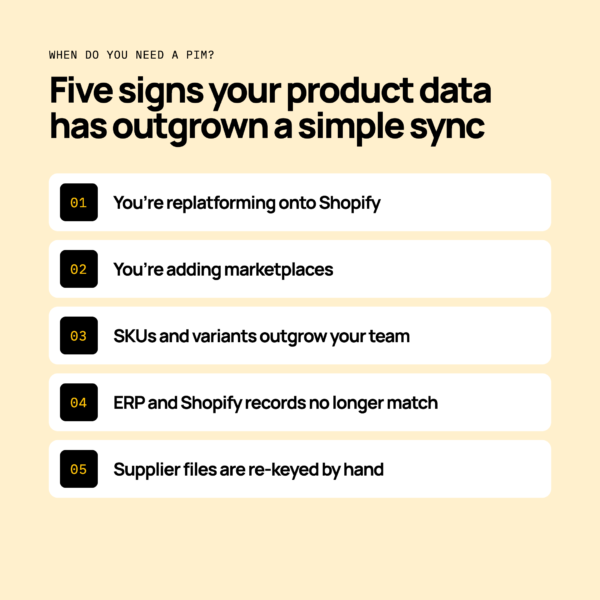
When do you need a PIM at all?
A PIM earns its place when product data lives in several systems and keeps drifting apart. If your ERP and Shopify hold different versions of the same product, you’re close to that point.
Common trigger moments:
- You’re replatforming onto Shopify and need to clean and restructure product data.
- You’re adding marketplaces, each with its own attribute rules.
- Your SKU and variant counts are growing faster than your team can edit them.
- Your ERP item records and Shopify products no longer match.
- Suppliers send product data in files that someone re-keys by hand.
You may not need a PIM yet. If you sell a small catalogue on one channel, and your ERP and Shopify stay in step, a well-run sync may be enough.
Do consider a PIM when enrichment work is slowing launches. Don’t buy one to fix poor data habits that a clear field owner would solve.
Who should own product data is a separate decision. We cover it in PIM vs ERP.
What should you ask before shortlisting a PIM?
Start with internal questions, before you speak to any vendor. Your answers set the criteria.
- Who owns product data today?
- Which systems need it: Shopify, your ERP, marketplaces, your warehouse management system (WMS)?
- How many channels and variants do you run?
- Who edits product data, and how often?
Map where product data lives today
List every place a product record exists. That usually means ERP item records, Shopify products, spreadsheets and supplier files.
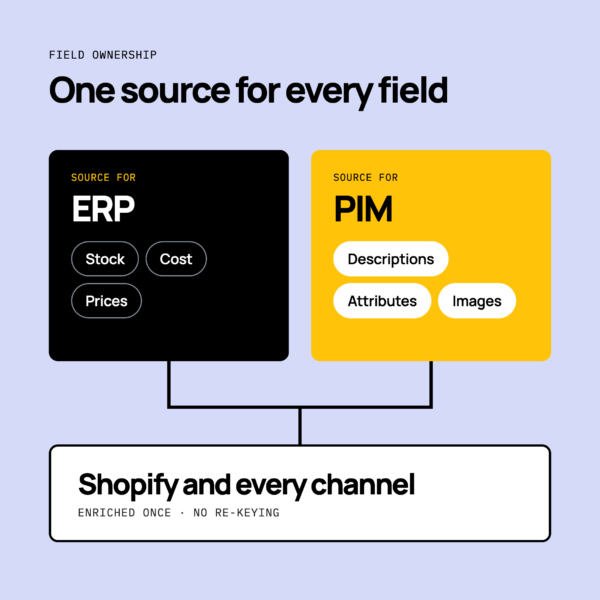
Then describe what should happen. A product is enriched once, and the result reaches every channel without re-keying.
Agree who owns which fields
Field ownership means one system is the source for each piece of data. A common pattern is the ERP for stock and cost, and the PIM for descriptions and attributes.
At the shortlisting stage, a high-level split is enough. The full argument sits in our PIM vs ERP guide.
How important is integration fit when choosing a PIM?
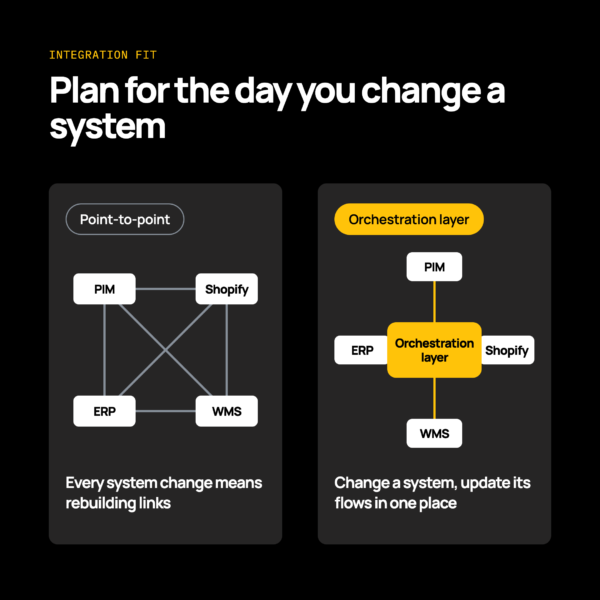
Integration fit is usually the deciding criterion. A PIM that can’t exchange data reliably with Shopify and your ERP creates more manual work, not less.
Ask which connection methods you’ll need:
- Prebuilt connectors, which talk directly to each system’s API.
- A connector builder, for systems not yet in the marketplace.
- Files over SFTP, common with suppliers and legacy systems.
- Electronic data interchange (EDI), for trading partners.
Think about change as well. You’ll probably swap an ERP or replatform within the life of a PIM. An orchestration layer keeps the stack safe to change, where a tangle of point-to-point links has to be rebuilt each time.
Patchworks is the retail-first, AI-native orchestration layer for retail tech stacks, and an iPaaS (integration platform as a service). It sits between your PIM, Shopify and ERP. For one example, see our Bluestone PIM integration.
Native connector or orchestration layer?
A PIM vendor’s own connector is often the quickest route for a single pairing. An orchestration layer suits you better when several systems share the same product data.
A native connector is built and supported by the PIM vendor, and is usually tuned to that vendor’s data model.
An orchestration layer coordinates every system in one place. If you change your ERP or replatform, you update the flows in that layer rather than rework each connection.
Ask how each option behaves on the day you change a system, not only on the day you go live.
What to check on data flows
Check that each flow describes what should happen, in both directions where needed.
- Products and variants flow from the PIM to Shopify.
- Stock and prices flow from the ERP to Shopify.
- Images and attributes flow to marketplaces.
Then check the operational side. How are errors handled? How do you monitor flows, and who sees a failure first?
Treat visibility as a buying criterion, so problems are caught before shoppers see them.
For a worked pairing, see the Shopify and NetSuite Integration Pair.
What does total cost of ownership include?
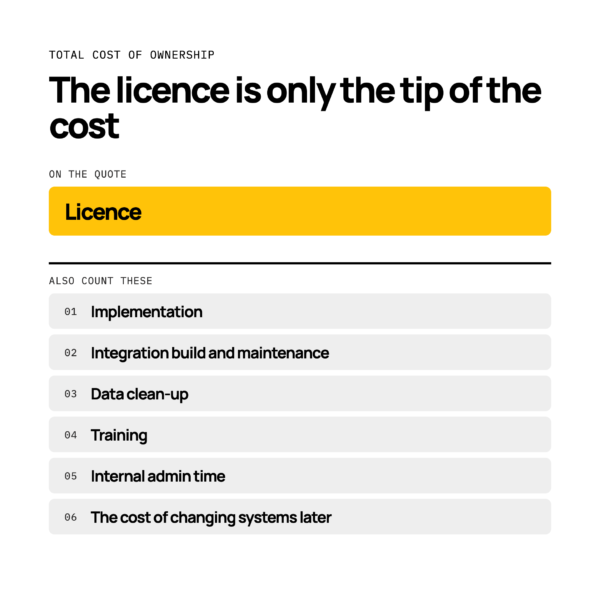
Total cost of ownership (TCO) covers far more than the licence. Count each of these:
- Licence.
- Implementation.
- Integration build and ongoing maintenance.
- Data clean-up.
- Training.
- Internal admin time.
- The cost of changing systems later.
Your own figures depend on your catalogue and stack, so build the list with your finance team.
Long-term cost falls when you rely less on custom code and single developers. A PIM integration that only one person understands is a risk you pay for later.
What questions should you put to vendors?
Put the same questions to every vendor, and score the answers.
Integration
- Which connection methods do you support?
- How do you connect to our ERP?
- What happens when we replatform?
Data model
- How do you handle variants?
- Can we model attributes per channel?
- How do you manage images?
Governance
- Who can edit which fields?
- Is there an audit trail?
- How do approvals work?
Support
- How are sync failures surfaced?
- Who helps us during peak trading?
- What does onboarding involve?
Cost
- What is in the licence?
- What do extra channels or users cost?
- What does the roadmap look like?
How do you run a PIM shortlist and proof of concept?
Run a PIM shortlist and proof of concept in three steps.
- Score each vendor against your criteria.
- Test with real SKUs and variants, not a clean sample.
- Test the Shopify and ERP flows end to end, including failures.
Finish testing before peak trading. A change made in the weeks before peak leaves little room to fix what you find.
For the full picture, read our guide to PIM integration.