Summary
You stop overselling by doing three things: make one system the source of truth for the stock you can actually sell, push every change to every channel within seconds, and hold a small buffer back on the channels where an oversell costs you most. Everything else in multichannel inventory management is detail on top of those three.
The detail matters more than it did. Shopify’s Fall ’26 Edition made its native inventory tools noticeably stronger. The same Edition also lets shoppers check out inside AI assistants, so stock is now drawn down from more places at once.
This guide covers what Shopify now handles on its own, where oversells still slip through once an ERP, warehouse, 3PL or marketplace is involved, and a six-step approach to closing the gaps before your next peak.
What is overselling, and why does it get worse as you add channels?
Overselling is when you take orders for more units than you can fulfil, because the stock figure a channel shows is out of date. The product looks available on your website or marketplace listing, a customer buys it, and the order can’t be shipped.
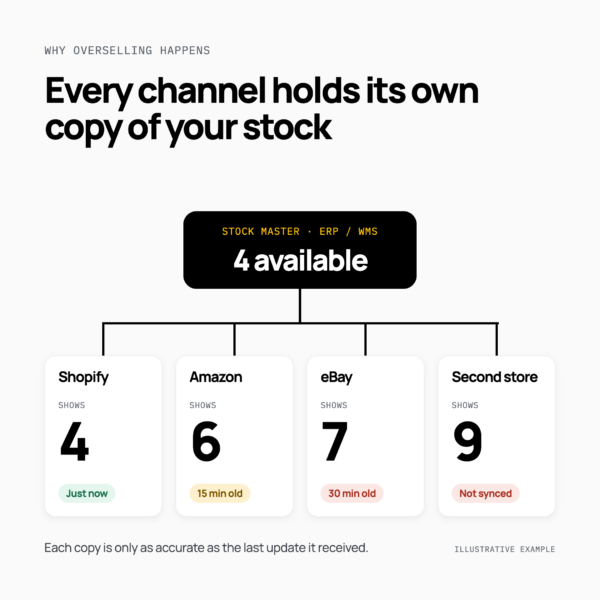
It’s rarely a counting problem. It’s a timing and ownership problem. Every channel shows a copy of your stock figure, and each copy is only as accurate as the last update it received. With one store and one warehouse, there’s one copy to keep right. Add Amazon, eBay, TikTok Shop, a second storefront and a 3PL, and you have half a dozen copies, each updated on a different schedule by a different system.
These are the most common causes:
| Cause |
What happens
|
What fixes it |
|---|---|---|
| Batch sync lag |
Stock updates run every 15–30 minutes, so channels keep selling units that have already gone
|
Sync on every stock change, not on a schedule
|
| More than one source of truth |
The ERP, WMS and storefront each hold a different figure, and nobody knows which is right
|
One master for available-to-sell stock
|
| Shared stock pools |
Several stores or channels advertise the same units, so one unit can sell twice
|
A pooled figure, allocated in real time
|
| Late marketplace updates |
Listings managed outside your store platform lag behind sales elsewhere
|
Push stock to marketplaces on every change, with buffers
|
| Returns and receipts |
Returns go back on sale before inspection; 3PL receipts arrive in batches
|
Clear rules for when stock becomes sellable
|
| Bundles and kits |
Selling a component doesn’t reduce stock on the bundles that contain it
|
Bundle logic that updates every related SKU
|
| System outages |
An ERP or WMS goes offline mid-peak and updates are lost
|
Queued updates with automatic retry
|
The pattern is the same in every row: each new channel adds another place where stock can sell before the others hear about it.
What does overselling actually cost?
The refund is the obvious cost, and usually the smallest. Every oversold order also means a customer service contact, an apology and, often, a customer who doesn’t come back. On marketplaces, cancellations you initiate count against your seller performance, so repeated oversells can affect how your listings are treated.
At scale, it adds up quickly. Gym wear brand AYBL ran six Shopify stores that all shared one stock pool, which meant it was effectively advertising six times the stock it had. Its previous connection between Shopify and its warehouse system was too slow to keep up. At one point, AYBL had to refund £300,000 of orders and contact around 7,000 customers. You can read how AYBL stopped overselling in the full case study.
How to stop overselling on Shopify: what it now handles natively
Shopify inventory management has improved a lot this year, and it deserves credit. Since Stocky retired at the end of August 2026, purchase orders, transfers between locations and stock counts all live in the Shopify admin. The Fall ’26 Edition builds on that with:
- Scheduled stock counts you can set by item, location and timeframe, then carry out in Shopify POS.
- Native stock counts with barcode scanning and detailed logs, so you can see who counted what before adjusting inventory.
- Metafields on inventory transfers, so transfers can carry extra detail such as an ERP reference.
- Purchase orders you can query through the Admin API, which makes it easier to match Shopify records with procurement in an ERP.
These sit alongside tools Shopify already had: inventory across multiple locations, and a per-product setting that stops a product selling once it reaches zero.
Orders placed through AI assistants land in your Shopify admin and draw from the same inventory, so Shopify handles them like any other order. The change is pace: more places to buy means stock runs down faster.
If Shopify is your only storefront and holds the true stock figure, the native tools may be all you need. The gaps open up when stock lives, or sells, somewhere Shopify can’t see. You can also see how Patchworks works with Shopify on our Shopify integration page.
Where oversells still happen once ERP, WMS, 3PL and marketplaces are involved
Shopify’s tools are accurate about the stock Shopify knows about. Oversells happen when the true figure lives somewhere else, or when sales happen somewhere Shopify can’t see.
The ERP or WMS is the stock master
For most growing brands, the ERP or warehouse system holds the real stock figure, and Shopify holds a copy. That copy is only as fresh as the last update. If updates arrive in batches, Shopify keeps selling from a stale number between them. This is the most common reason brands need ERP and ecommerce integration that moves stock as it changes.
Marketplaces sell outside Shopify
When Amazon, eBay or TikTok Shop listings are managed outside Shopify, a sale in one place doesn’t reduce stock in the others unless something tells them. The window between a sale and the next update is where oversells happen, and it’s widest during peak. That’s the job of marketplace and multichannel integration.
Several stores share one stock pool
Shopify Plus brands often run expansion stores for different regions. Shopify’s documentation is clear that inventory isn’t synced between stores, so if they share one warehouse, each store advertises the full pool. That was AYBL’s problem across six stores.
3PL receipts, returns and transfers arrive late
When a 3PL confirms receipts or returns in batches, sellable stock lags behind physical stock. Returns that go straight back on sale before inspection cause the opposite problem. Both are solved with 3PL stock updates that flow as events, with rules for when stock becomes sellable.
Bundles and incoming stock change what’s available
A bundle is only available if every component is. And if incoming purchase-order stock is counted as available too early, you can sell units that haven’t arrived.
Here’s how the two approaches compare:
| Scenario |
Shopify native
|
Orchestrated across systems |
|---|---|---|
| Accurate counts inside one store |
Yes — scheduled and native stock counts
|
Not needed for this alone
|
| Stock across several locations in one store |
Yes — multi-location inventory
|
Useful when locations are managed in an ERP or WMS
|
| Marketplaces managed outside Shopify |
No — Shopify doesn’t see those sales
|
Every sale updates every channel
|
| ERP or WMS as the stock master |
Partly — Shopify holds a copy, as fresh as the last update
|
Changes push from the master in seconds
|
| 3PL receipts and returns |
Partly — depends on how often the 3PL updates Shopify
|
Updates flow as events, with rules for returns
|
| Several stores sharing one pool |
No — inventory isn’t synced between stores
|
One pooled figure allocated across stores
|
| Buffers for specific channels |
Limited — one stock figure per location
|
Rules per channel, such as hiding the last few units
|
| Bundles and kits |
Partly — inside one store
|
Bundle logic across every system
|
| A connected system goes offline |
Depends on the connection
|
Updates are queued and retried automatically
|
How to stop overselling across channels: six steps
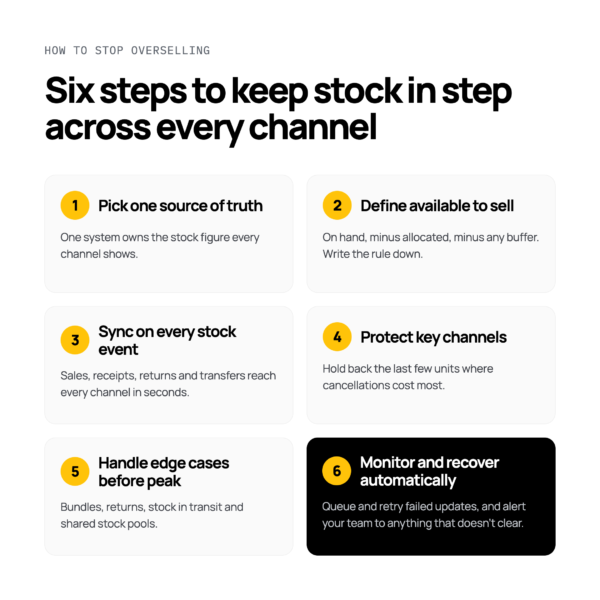
Whatever your stack, these six steps close the gaps where oversells happen.
1. Pick one source of truth for available-to-sell stock
Decide which system owns the number every channel shows. For most brands that’s the ERP or WMS, not the storefront. Every other system receives that figure; none of them keeps its own version.
2. Define what “available to sell” means
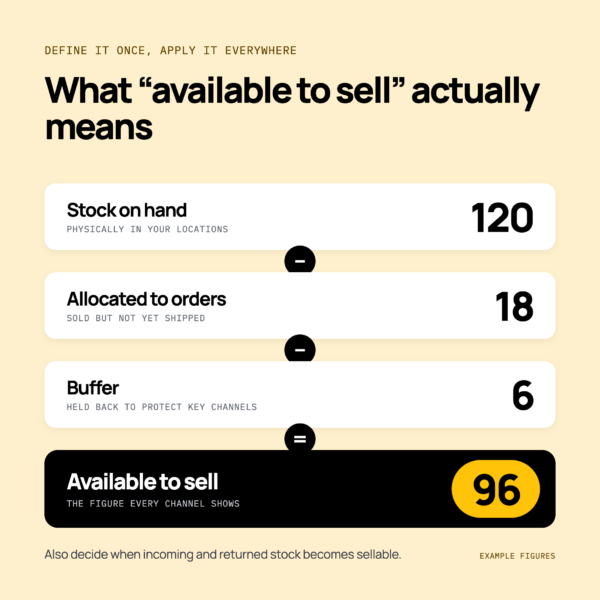
Available to sell is usually stock on hand, minus stock already allocated to orders, minus any buffer. Decide whether stock on an incoming purchase order counts, and when returned stock becomes sellable again. Write the rule down so every system applies it the same way.
3. Sync inventory across channels on every stock event
Replace scheduled batches with event-driven updates: a sale, receipt, return or transfer triggers an update to every channel within seconds. A 15-minute batch might be fine on a quiet Tuesday, but at peak it’s enough time to sell the same unit several times. This is what real-time inventory synchronisation is for.
4. Protect your most important channels with buffers
Hold back the last few units of fast-moving products from marketplaces that penalise cancellations, and reserve stock for your own storefront where margins are better. Buffers cost you a few sales at the edges and save far more in refunds and lost trust.
5. Handle the edge cases before peak
Check how your setup treats bundles and kits, returns awaiting inspection, stock in transit between locations, and stores that share one pool. These are the cases that work fine at normal volumes and break under pressure.
6. Monitor every sync and recover automatically
Updates fail sometimes. What matters is that a failure is caught and retried before a customer finds it. Queue updates when a system is offline, retry automatically when it’s back, and alert your team to anything that doesn’t clear. Our peak resilience checklist covers the rest of the preparation.
- Do sync on every sale, receipt and return. Don’t rely on a 15-minute batch during peak.
- Do make one system the stock master. Don’t let each channel keep its own version.
- Do hold a buffer on marketplaces. Don’t advertise your last unit everywhere at once.
- Do test your sync before peak. Don’t find out it failed from a customer.
Native or orchestrated: which do you need?
You can probably stay native if:
- Shopify is your only storefront.
- Your stock is held in locations Shopify manages directly.
- You don’t sell on marketplaces outside Shopify.
You probably need an orchestration layer if:
- Your ERP or WMS holds the true stock figure.
- You sell on marketplaces managed outside Shopify.
- A 3PL holds some or all of your stock.
- Several stores or brands share one stock pool.
- Your peak volumes are high enough that minutes of lag mean real oversells.
This isn’t a choice between inventory management software and an integration platform. Inventory software helps you manage and plan stock; an integration platform keeps every system’s figure in step. Many brands use both.
How Patchworks keeps stock in step
Patchworks is an integration platform built for retailers and brands. It connects your ERP, WMS, 3PLs, storefronts and marketplaces so stock moves as events: when a sale happens or a shipment is scanned, the update reaches every system in seconds.
You can set buffers to protect specific channels, combine stock from several warehouses, stores and 3PLs into one available-to-sell figure (or split it by region), keep bundle stock accurate, and reconcile stock between your ERP and WMS. If a system goes offline, updates are queued and retried as soon as it’s back.
With Patchworks keeping stock in step across its six Shopify stores, AYBL cut oversells by 90% at its most recent peak. Bare Minerals connected Shopify to its 3PL, GXO, so Shopify took stock levels straight from the warehouse, and reduced order cancellations caused by incorrect inventory by 50%. You can find more examples in our iPaaS use cases.
Start with a prebuilt connector, or build exactly what you need with AI Studio and Connector Builder. And as Shopify’s only Certified Technology Partner for integrations, Patchworks is built to work alongside the native tools covered above, not replace them.