TL;DR: Shopify PIM integration connects your Shopify store to a Product Information Management system, so product content, pricing and attributes stay consistent everywhere you sell — the layer that stops your catalogue drifting apart as you add channels, markets and SKUs.
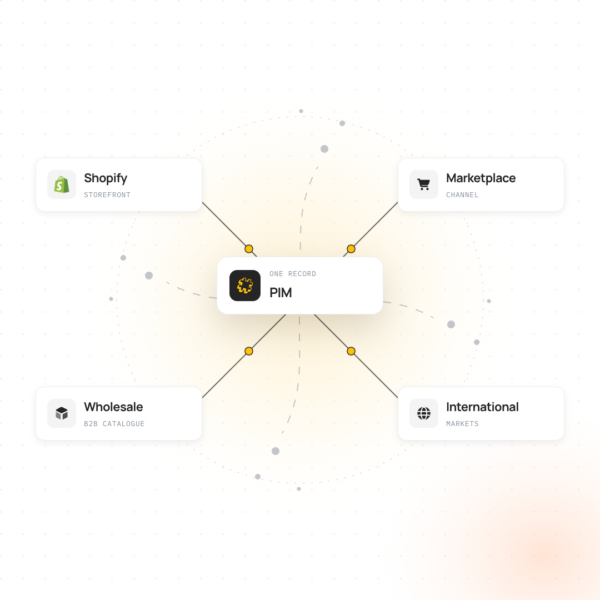
Shopify PIM integration connects Shopify to a dedicated Product Information Management (PIM) system, so descriptions, images, attributes and pricing rules live in one place and flow out to your storefront (and every other channel) automatically, rather than being managed by hand inside Shopify itself.
Growing Shopify brands, multi-channel retailers and Shopify Plus merchants tend to hit the same wall: a product catalogue that started out simple in one store becomes genuinely hard to manage once you’re selling across five, ten or fifty channels, regions or marketplaces. PIM integration is the infrastructure that keeps that catalogue coherent as it grows, rather than something that quietly falls apart the moment a second sales channel gets added.
This guide covers what Shopify PIM integration actually involves, whether Shopify itself counts as a PIM, what data typically moves between the two systems, and how to think about choosing the right PIM and integration approach for your business.
What Is Shopify PIM Integration?
A Product Information Management system is where product content is created, enriched and governed — titles, descriptions, technical attributes, imagery references, pricing rules and channel-specific variations. Shopify is where that content is presented to shoppers and turned into a sale.
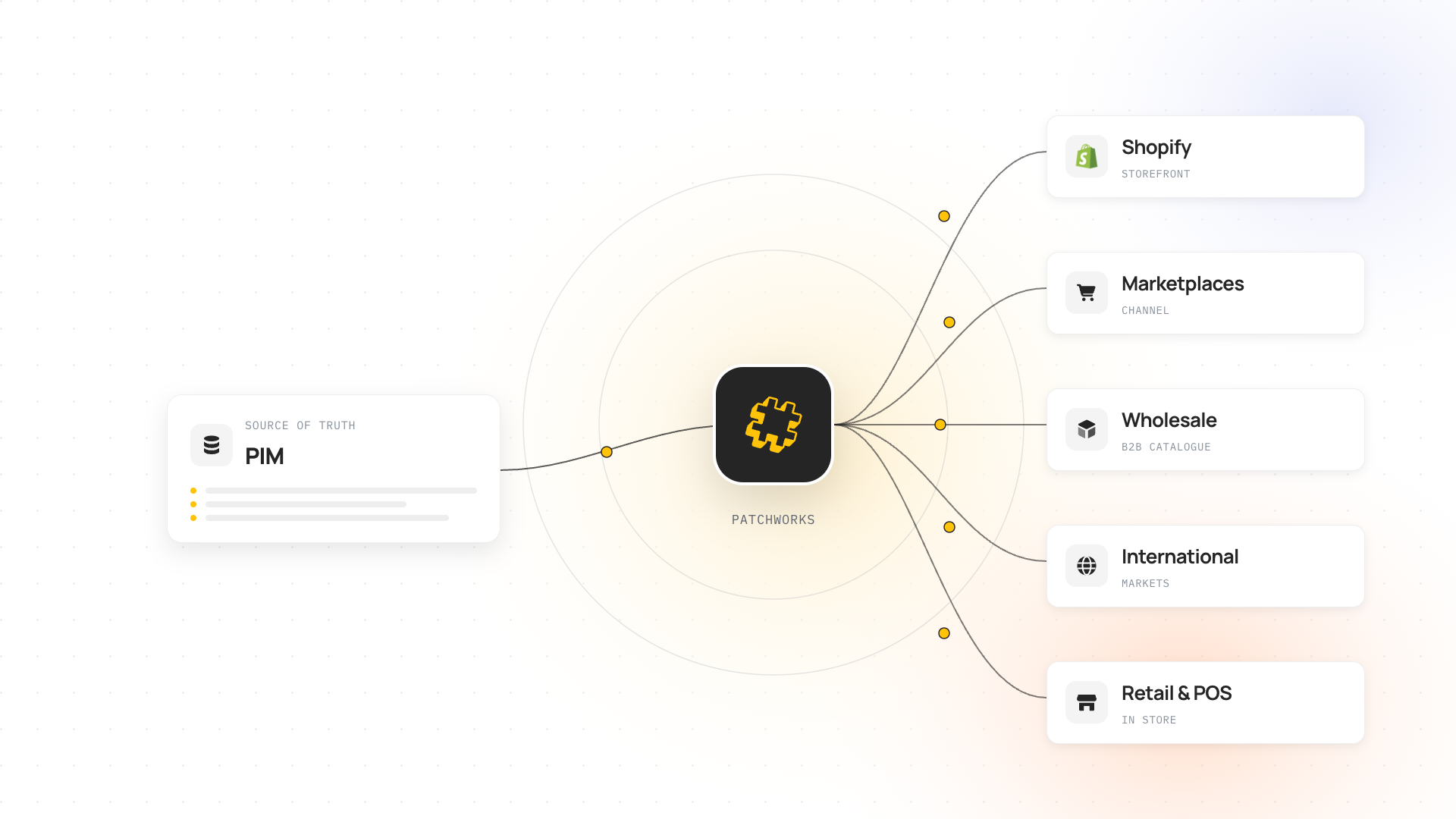
Shopify PIM integration is what keeps the two in sync. A practical example: your team enriches a new product in the PIM — finished copy, verified attributes, approved imagery — and integration pushes that record straight into Shopify, formatted correctly for your storefront, without anyone re-typing it or exporting a spreadsheet.
This is what Shopify integration with Patchworks is built to do: connect Shopify to whichever PIM you run, using pre-built connectors rather than custom development for every new pairing.
Is Shopify a PIM System?
No — Shopify is not a PIM system. Shopify stores product titles, descriptions, images and variants, and it does that well for a single storefront. What it isn’t built to do is govern rich, structured product content across many channels, locales and teams at once: enforcing mandatory attributes, managing approval workflows, handling multi-language variants at scale, or syndicating consistent listings out to marketplaces with their own strict data requirements.
That distinction matters more as you grow. A single-store Shopify brand with a few hundred SKUs can often manage product content directly in Shopify without friction. The moment you’re selling the same products across a storefront, a wholesale channel, and two or three marketplaces, Shopify starts acting as one destination for content rather than the place it’s actually managed — and that’s exactly the gap a PIM is built to close.
Why Ecommerce Brands Add a PIM to Shopify
The operational drivers tend to be consistent across most brands that reach for a PIM: product descriptions that read differently across channels, missing or incorrect attributes rejected by marketplace feeds, teams overwriting each other’s edits, and a genuinely painful amount of manual re-entry every time a product range is updated.
A common scenario: you’re expanding from Shopify into Amazon and a couple of European storefronts, and suddenly the same product needs different attribute sets, different language variants and different compliance data for each channel — all while staying recognisably the same product. Trying to manage that inside Shopify’s native product editor, by hand, is where things start to break.
Do treat a PIM as the point where product data becomes a governed asset rather than something living in someone’s spreadsheet.
Don’t assume this is only an enterprise problem — catalogue complexity, not company size, is usually what triggers the need.
How Shopify PIM Integration Works
At a high level, integration works through the PIM and Shopify communicating via APIs, either directly or through an integration platform (iPaaS) that sits between the two. It’s structured, repeatable data movement rather than one-off custom engineering.
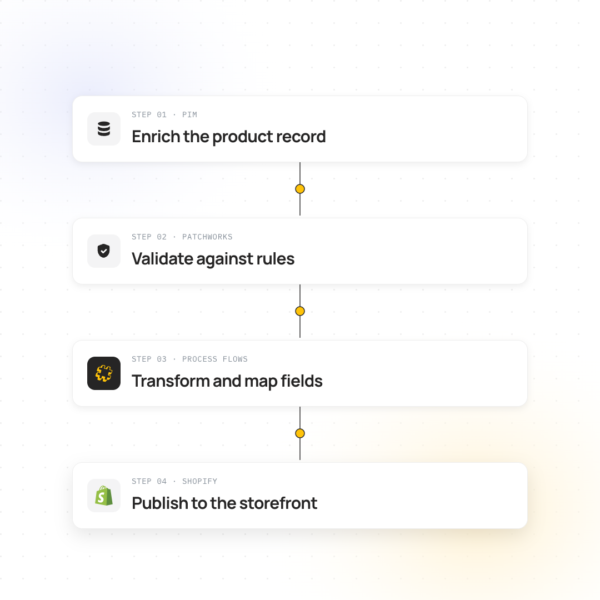
A typical flow: a product is created or enriched in the PIM → content is validated against your rules (mandatory fields, approved status, channel-specific requirements) → the integration platform maps and transforms that data into the shape Shopify expects → Shopify receives the update and reflects it on the storefront, usually within minutes rather than days.
The flow is mostly one-directional — content moves from PIM to Shopify — though some setups also feed limited data back the other way, such as live sales performance informing which product content gets prioritised for enrichment next.
What Data Syncs Between a PIM and Shopify
Most Shopify PIM integrations focus on five categories of data, each with a slightly different role to play once it reaches the storefront.
| Data Type |
What typically syncs
|
Direction | Why it matters |
|---|---|---|---|
| Product content |
Titles, descriptions, marketing copy, SEO metadata
|
PIM → Shopify
|
Keeps messaging consistent across every channel a product appears on
|
| Attributes & specs |
Size, material, technical specifications, compliance data
|
PIM → Shopify
|
Prevents marketplace listing rejections and customer confusion
|
| Digital assets |
Image references, asset variants, alt text
|
PIM → Shopify (sometimes bi-directional)
|
Keeps visual presentation aligned with approved brand assets
|
| Channel-specific Listings |
Marketplace-mandated fields, localisation, category mapping
|
PIM → Shopify & other channels
|
Meets the specific data requirements of each sales channel
|
Product Content and Descriptions
Titles, descriptions and marketing copy are usually authored and approved centrally in the PIM, then pushed out consistently to Shopify and every other channel — removing the drift that creeps in when the same product gets described slightly differently in five different places.
Digital Assets and Imagery
Rather than uploading images separately into Shopify, most PIM setups reference a managed asset library, so a single approved image and its alt text propagate everywhere the product is listed.
Pricing, Variants and Channel Data
Pricing rules, variant structures (size, colour, bundle) and channel-specific fields — category mappings, mandatory marketplace attributes, localisation — typically live in the PIM as the single source of truth, with Shopify (and any other channel) reflecting whatever’s current.
PIM vs ERP vs DAM: What’s the Difference?
These three get confused often, and the confusion is understandable — all three sit somewhere in the data flowing into Shopify. The difference comes down to what each one is actually the system of record for.
| System | What it manages | Typical data |
|---|---|---|
| PIM | Product content and attributes | Descriptions, specifications, pricing rules, channel variants |
| ERP | Operational and financial data | Orders, inventory levels, accounting, fulfilment |
| DAM | Digital assets themselves | Images, video, brand files |
Many Shopify brands run a PIM and an ERP side by side, both feeding into Shopify: the ERP handles what happens operationally once a sale is made, while the PIM handles what a customer sees before they buy.
Choosing a PIM for Shopify
The right PIM depends on catalogue size, channel complexity and how much workflow governance you actually need — not which platform has the longest feature list. The table below is a neutral starting point covering the PIM platforms Patchworks connects to, ordered alphabetically rather than by recommendation.
| PIM | Typically suited to |
|---|---|
| Akeneo | Mid-market to enterprise, open-source and commercial tiers |
| Bluestone PIM | Cloud-native, mid-market retailers |
| Ergonode | Open-source, budget-conscious mid-market |
| inriver | Enterprise, complex multi-brand catalogues |
| Pimperbly | UK-based, SME to mid-market |
| Plytix | SME and growing ecommerce brands |
| Salsify | Enterprise, high SKU-count and syndication-heavy catalogues |
Worth evaluating each against your actual catalogue complexity, the number of channels you sell on, and how much workflow and approval structure your team genuinely needs — rather than defaulting to whichever platform is best known.
How to Integrate a PIM With Shopify
You’ll generally choose between a native Shopify app built by the PIM vendor, or connecting the two through an integration platform (iPaaS) that sits between them. Each represents a different tradeoff between setup speed, flexibility and how well the integration holds up as your stack grows.
Native PIM Apps
Many PIM vendors offer a Shopify app directly from the app store. These are usually quick to set up for a single-store, single-PIM pairing, but tend to offer limited flexibility once you add a second sales channel, a second Shopify store, or systems the app wasn’t built to talk to.
iPaaS-Connected Integration
An integration platform sits between Shopify, your PIM, and everything else in your stack — ERP, marketplaces, other storefronts — so product data flows through one governed layer rather than a separate point-to-point connection for every pairing. This is generally the better fit once you’re managing more than one channel or system alongside Shopify.
Do treat data mapping as the first real piece of work in either approach — most delays come from attribute structures not lining up between PIM and Shopify, not from the integration technology itself.
Don’t assume a native app is automatically simpler long-term — it’s often simpler to set up, but harder to extend once your channel mix grows.
Shopify PIM Integration for Multichannel and Marketplace Selling
Marketplaces are usually where PIM integration earns its keep fastest. Amazon, eBay and similar channels enforce their own mandatory attribute sets and category structures, and a listing that’s missing the right field gets rejected outright rather than published with a gap. A PIM that’s properly integrated with Shopify can maintain those channel-specific requirements centrally, so the same underlying product data gets correctly reshaped for each destination automatically.
This becomes especially important once product content and stock availability both need to stay accurate across the same set of channels at the same time. If keeping inventory levels themselves synchronised across channels is the more pressing concern alongside content, Patchworks’ inventory and stock synchronisation solution covers that side of the multichannel puzzle.
How Patchworks Connects PIM Systems to Shopify
Patchworks connects Shopify to your PIM using pre-built connectors, so product content, pricing and attributes flow through automatically rather than needing custom development for every new system pairing. The same integration layer can also connect your ERP, WMS and marketplaces, so PIM data isn’t managed in isolation from the rest of your stack.
Browse the full list of certified PIM connectors on the PIM Integrations page, or see how the Shopify integration works alongside everything else in your stack.
Frequently Asked Questions About Shopify PIM Integration
Is Shopify a PIM system?
No — Shopify manages your storefront and basic product listings, but it isn’t built to govern rich product content across multiple channels the way a dedicated PIM is.
Do I need a PIM if I already use Shopify?
If you’re selling on Shopify alone with a modest catalogue, probably not yet. Once you’re managing products across multiple channels or regions, a PIM becomes the system of record Shopify pulls from.
What’s the difference between a PIM and a DAM?
A PIM manages structured product data (descriptions, attributes, pricing); a DAM manages the digital assets themselves (images, video). Many brands run both, connected.
What’s the difference between a PIM and an ERP?
An ERP manages operational data — orders, inventory, finance. A PIM manages product content and attributes. They typically sit side by side, both feeding Shopify.
Which PIM systems integrate with Shopify?
Patchworks connects Shopify to a range of PIM platforms, including Akeneo, Bluestone PIM, Ergonode, inriver, Pimperbly, Plytix and Salsify, each via pre-built connectors rather than custom development.
How long does PIM-Shopify integration typically take?
Pre-built connectors generally implement in weeks; fully custom builds can take considerably longer depending on catalogue complexity.