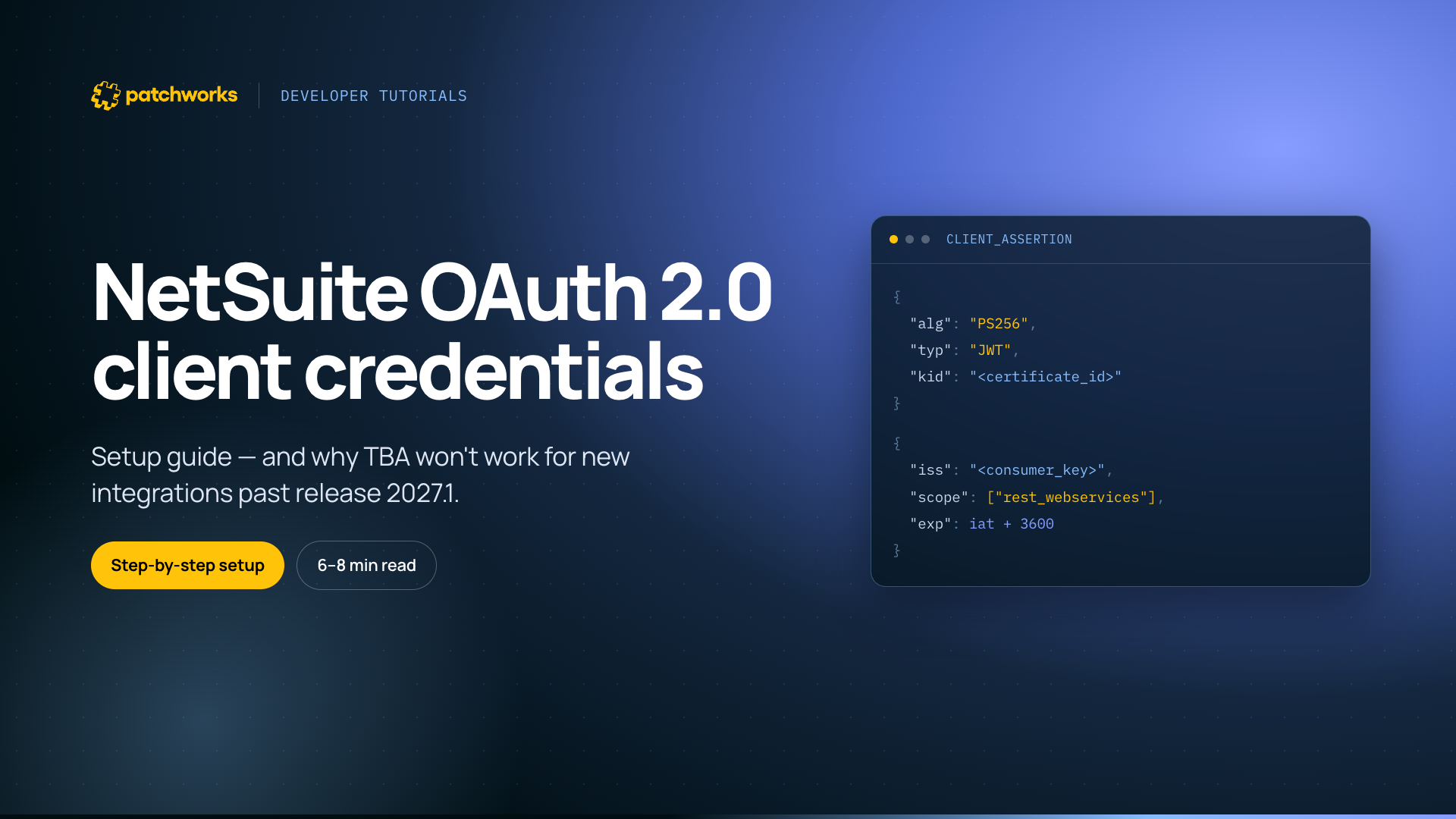
TL;DR: NetSuite is phasing out Token-Based Authentication (TBA), its OAuth 1.0-style method. Per NetSuite’s 2026.1 release notes, no new integrations will be able to use TBA from release 2027.1. If you’re building a new NetSuite integration today, use OAuth 2.0 client credentials instead. This covers the full setup — generating a certificate, configuring the integration record in NetSuite, building the JWT client assertion, and doing it inside Patchworks — plus the pitfalls that trip people up.
Written by Jim Herbert, CEO for Patchworks iPaaS
If you’ve set up a NetSuite integration in the last few years, there’s a good chance you used Token-Based Authentication (TBA) — a consumer key and secret, a token ID and secret, each request individually signed. It’s worked fine for a long time. It’s also on its way out.
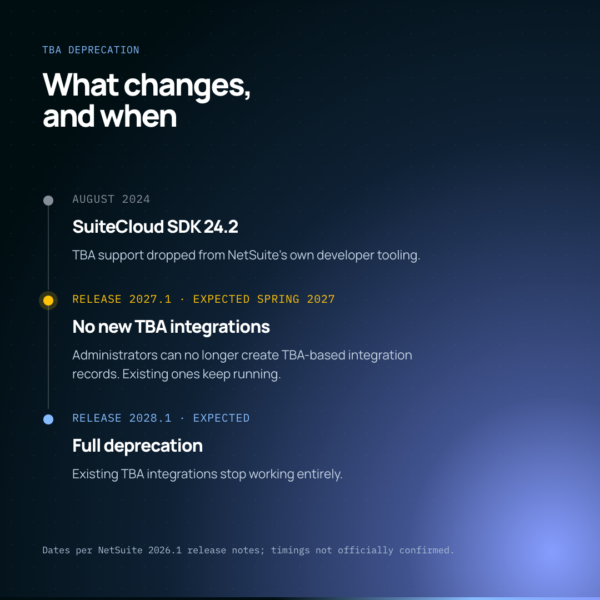
NetSuite’s SuiteCloud SDK dropped support for TBA in its own tooling from version 24.2, released August 2024. More importantly, NetSuite’s 2026.1 release notes are explicit: administrators won’t be able to create new TBA-based integrations from release 2027.1. NetSuite hasn’t confirmed an exact date yet, but based on its usual release cadence that’s likely to land nearer spring 2027 — more realistically late March/early April than a straightforward “Q1” — so it’s worth keeping an eye on the Release Preview environment as it becomes available for early confirmation. Existing TBA integrations keep running for now. New ones shouldn’t be built on it.
The replacement is OAuth 2.0 client credentials — a machine-to-machine flow built for exactly this kind of server-to-server integration, with no user login and no client secret sitting in a config file. Here’s how to set it up properly, and where people usually get it wrong.
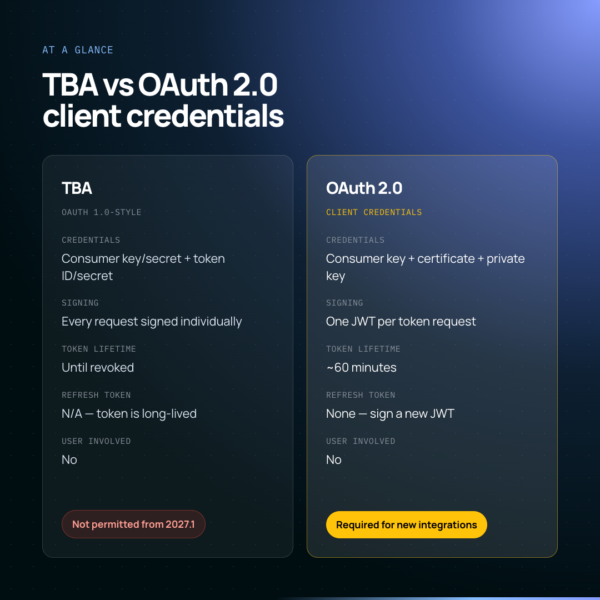
TBA vs OAUTH 2.0 Client Credentials, at a glance
| TBA (OAuth 1.0-style) | OAuth 2.0 client credentials | |
| Credentials | Consumer key/secret + token ID/secret | Consumer key + certificate + private key |
| Request signing | Every request signed individually | A JWT signed once per token request |
| User involved | No | No |
| Token lifetime | Doesn’t expire until revoked | ~60 minutes |
| Refresh token | N/A — token is long-lived | None — sign a new JWT when it expires |
| New integrations after 2027.1 | Not permitted | Required |
What you need before you start
- REST Web Services enabled (Setup > Company > Enable Features > SuiteCloud).
- OAuth 2.0 enabled under Manage Authentication, same tab.
- Admin access, or an admin available to complete the NetSuite-side steps.
- A role with permission to create the integration record and access whatever records the integration needs — sales orders and customers, for example.
Generating a certificate: A certificate and private key, not a client secret
This flow authenticates with a certificate and private key pair rather than a shared secret. Generate one from the command line:
| openssl req -x509 -newkey rsa:4096 -sha256 -keyout auth-key.pem \
-out auth-cert.pem -nodes -days 730 |
You’ll be prompted for some identifying information — organisation name, email — NetSuite doesn’t validate any of it. This produces two files: auth-cert.pem, which gets uploaded to NetSuite, and auth-key.pem, which stays private and signs your JWTs. Set a calendar reminder against the -days value. An expired certificate fails quietly, not loudly — nothing breaks until someone notices tokens have stopped issuing.
Setting it up in NetSuite: Integration record, credentials mapping, certificate upload
- Log in to NetSuite as an admin.
- Go to Setup > Integration > Manage Integrations > New. Enable the Client Credentials (M2M) grant and note the Consumer Key — this is your client ID, and becomes the iss claim in your JWT.
- Go to Setup > Integration > OAuth 2.0 Client Credentials (M2M) Setup and create a new credentials mapping.
- Select the entity (usually your integration user), the role (typically Administrator, or a scoped role with just what the integration needs), and the application (the integration record from step 2).
- Upload auth-cert.pem.
- Note the certificate ID that’s generated — this becomes the kid in your JWT header.
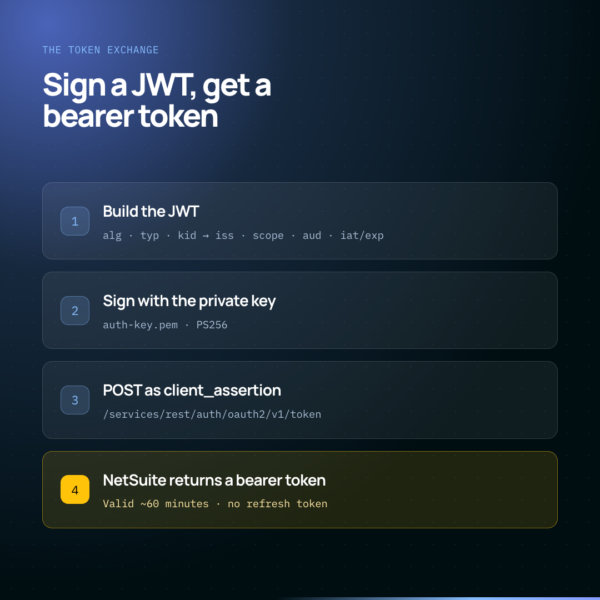
No login, no redirect, no refresh token
Client credentials means there’s no login step and no refresh token. Instead, your integration builds a signed JWT each time it needs an access token, and NetSuite exchanges that JWT for a short-lived bearer token.
The JWT header carries:
- alg — PS256 (or RS256 — must match the algorithm registered against the certificate).
- typ — “JWT”.
- kid — the certificate ID from NetSuite.
The payload carries:
- iss — your Consumer Key.
- scope — the scopes granted on the integration record, typically [“rest_webservices”], plus “restlets” if you’re calling RESTlets.
- aud — https://{account_id}.suitetalk.api.netsuite.com/services/rest/auth/oauth2/v1/token
- iat / exp — issued-at and expiry. NetSuite tokens are short-lived, typically around 60 minutes, so exp shouldn’t be set much further out than that.
Sign the JWT with your private key, POST it to the token endpoint as a client_assertion, and NetSuite returns a bearer access token for subsequent REST calls. There’s no refresh token in this flow — when the access token expires, sign and exchange a new JWT.
Working with Patchworks: Same four credentials, one script to handle the signing
Patchworks’ NetSuite connector supports OAuth 2.0 client credentials natively, and needs the same four things gathered above: consumer key, account ID, private key, and certificate ID.
The one extra step is the JWT signing itself. Rather than every integration hand-rolling that, Patchworks ships a script from the script marketplace — “Netsuite Prereq Oauth2 CC” — that builds the header and payload, signs with PS256, and hands back a client_assertion. Install it, attach it as a pre-request script on the connector’s authentication settings, and select OAuth 2.0 client credentials as the authentication method.
Common pitfalls
- Account ID casing — NetSuite shows account IDs inconsistently between the login URL and elsewhere; use exactly what’s in the URL, lowercased (sandbox accounts with a -sb1 style suffix trip this up most often).
- Certificate/role mismatch — the credentials mapping must reference the same role your integration record and application are configured against, or authentication fails without an obviously helpful error.
- Clock skew — since exp is time-based and tokens are short-lived, a server clock more than a minute or two out can get tokens rejected as expired or not-yet-valid.
- Expired certificates — the failure is quiet; nothing breaks until the cert’s -days window closes, so track the expiry date somewhere that isn’t just “in the file.”
- Confusing this with the Authorization Code grant — that’s the user-facing, redirect-based OAuth 2.0 flow for things like customer portals. Client credentials is specifically for machine-to-machine integrations with no user present.
Don’t build a new NetSuite integration on Token-Based Authentication in 2026. It isn’t blocked yet, but it will be from release 2027.1, and migrating a live integration later is more work than starting on OAuth 2.0 now.
Do treat the certificate’s expiry date as an operational dependency, not a one-time setup step. An expired certificate fails quietly, not loudly.
Make the move with Patchworks
TBA isn’t broken today, and nothing forces a change this month. But every new NetSuite integration built between now and release 2027.1 either goes on OAuth 2.0 from the start, or becomes technical debt with a deadline attached. If you’re setting one up, it’s worth doing properly the first time.
Patchworks is a natural fit for making the move. OAuth 2.0 client credentials is a first-class authentication type on the NetSuite connector, not a bolt-on — but the bigger advantage is how the platform handles the switch itself. Because Patchworks lets you spin up a new NetSuite instance, swap it into existing flows, and redeploy across virtual environments using environment variables, moving a live integration from TBA to OAuth 2.0 doesn’t mean rebuilding it from scratch. You point the flow at the new authentication setup and redeploy, seamlessly.
Frequently Asked Questions
Is NetSuite Token-Based Authentication (TBA) deprecated?
NetSuite hasn’t switched TBA off for existing integrations, but it is being phased out. SuiteCloud developer tooling dropped support for it from version 24.2, and NetSuite’s 2026.1 release notes confirm new integrations won’t be able to use TBA from release 2027.1. An exact date hasn’t been confirmed, but it’s expected nearer spring 2027 than a strict Q1 cut-off — keep an eye on the Release Preview environment for confirmation closer to the time. Existing TBA integrations then have a further year’s grace before they stop working entirely, with full deprecation expected at release 2028.1.
What’s the difference between NetSuite TBA and OAuth 2.0 client credentials?
TBA signs each individual request using a consumer key/secret and token ID/secret pair, and the resulting token doesn’t expire until revoked. OAuth 2.0 client credentials signs a JWT once per token request using a certificate and private key, and exchanges it for a short-lived bearer token, typically valid for around 60 minutes.
Does NetSuite OAuth 2.0 client credentials use a refresh token?
No. Unlike the Authorization Code grant, the client credentials flow doesn’t issue a refresh token. When the access token expires, the integration signs and exchanges a new JWT to get another one.
What is the kid in a NetSuite JWT client assertion?
kid (key ID) is a field in the JWT header that tells NetSuite which certificate to validate the signature against. It’s set to the certificate ID generated when you upload your certificate to NetSuite’s OAuth 2.0 Client Credentials (M2M) Setup page.
Does Patchworks support NetSuite OAuth 2.0 client credentials authentication?
Yes. Patchworks’ NetSuite connector supports it natively, using the same consumer key, account ID, private key, and certificate ID gathered during NetSuite setup, with a marketplace script available to handle the JWT signing.